Pleco review: what's free, what's worth paying for, and the alternatives
Pleco is a free Chinese dictionary with one-time add-ons. Every add-on price, iPhone vs Android, a calculator for what to buy, and the best alternatives.

Pleco has sold Chinese dictionaries since the Palm Pilot, and some buyers from 2001 still use those purchases today. Most of the app is free. The hard part is knowing what to pay for.
If you're deciding whether to pay for Pleco, which add-ons to buy, or whether another app would suit you better, this review is for you. We checked every price on Pleco's store, the App Store and Google Play on 11 October 2026.
Key takeaways
- The free app is a real dictionary. Its two built-in dictionaries cover about 130,000 Chinese words.
- Most features cost $9.99, once. There's no subscription: you buy the camera lookup, flashcards or reader one at a time.
- Buy bundles on Pleco's website. The same Basic Bundle costs $5 less there than in the app.
- Android's free version does more. It includes simple flashcards and pop-up lookups in other apps; the iPhone version doesn't.
- You pay once for both platforms. Your add-ons move between iPhone and Android, on up to three devices.
- It's a dictionary, not a teacher. Pleco has no lessons and nothing that talks back.
The free app is already a full dictionary
Download Pleco and you get a working Chinese dictionary with nothing to unlock. It comes with two: CC-CEDICT, a free open-source dictionary, and PLC, Pleco's own, which adds parts of speech and example sentences with pinyin.
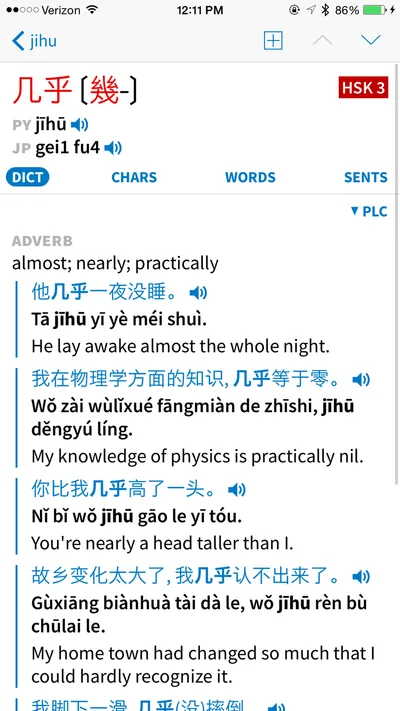
You can search by characters, by pinyin with or without tones, or in English. Each entry shows Simplified and Traditional forms and links every character to its own definition. Here's one we found among the screenshots Pleco shows on its App Store page:
The free app also gives you:
- Handwriting lookup. Draw a character you can't type on a full-screen pad.
- A clipboard reader. Paste Chinese text and tap any word to look it up.
- Audio. Your phone's voice reads words and sentences on iPhone; Android plays recorded syllables.
- Stroke order for 500 characters.
- Offline use. Pleco's FAQ says everything works without a connection once it's set up.
- No ads. Pleco doesn't nag you to buy anything, either.
A Google Play reviewer summed it up in April 2026: "Incredibly useful dictionary for learners even without any of the paid add-ons." If you mostly look words up, we think you may never need to pay.
What's free and what costs money
Everything beyond the basics is an add-on you buy once, inside the app or on Pleco's web store. We listed what the free app covers, and what each add-on adds:
Dictionaries
- Free app
- CC-CEDICT and PLC, Chinese to English
- Paid add-on
- Over two dozen more, from $6.99
Handwriting lookup
- Free app
- Full-screen pad
- Paid add-on
- Enhanced recognizer, $9.99 on iPhone
Camera lookup
- Free app
- None
- Paid add-on
- $9.99
Flashcards
- Free app
- Save words; simple cards on Android
- Paid add-on
- Spaced repetition and tests, $9.99
Reading files
- Free app
- Pasted text; shared web pages on Android
- Paid add-on
- PDFs, e-books and web pages, $9.99
Stroke order
- Free app
- 500 characters
- Paid add-on
- About 28,000, $3.99
Recorded word audio
- Free app
- Phone voice or syllables
- Paid add-on
- 34,000 words, $4.99 a voice
Chinese fonts
- Free app
- Standard
- Paid add-on
- Kai and Xing, $4.99 each, iPhone only
Sources: Pleco's web store, App Store listing and product pages, checked 11 October 2026. Web-store prices; the App Store charges $4.99 for stroke order.
Inside the app, Apple lists the most popular add-ons, with the bundles at higher prices:
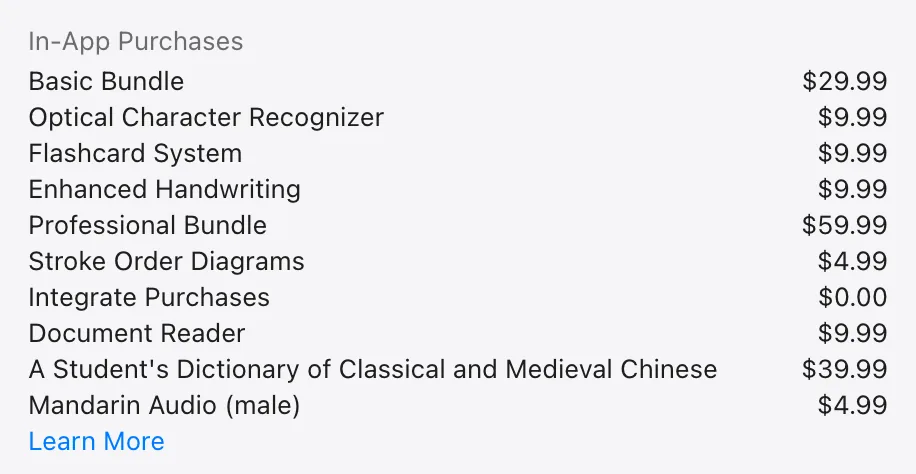
Most learners only want two or three of these features. That's where the bundles come in.
Paid dictionaries add English-to-Chinese and detail
The free dictionaries are big, but they're short on two things: English-to-Chinese entries and depth. The free iPhone app has no English-to-Chinese dictionary at all. You can type English, but you only find Chinese words whose definitions happen to match.
Pleco's web store sells 28 dictionaries. We lined up the main ones by size:
Sources: each dictionary's description on Pleco's web store and the App Store listing, checked 11 October 2026. CC-CEDICT has "over" 110,000; Oxford's count adds both directions.
Size isn't quality, though. In our view, the first dictionary worth adding is the Oxford, because it fills the English-to-Chinese gap. The ABC adds careful grammar labels, and Pleco itself recommends the Chinese-only Guifan for advanced students.
The bundles are cheaper on Pleco's website
Pleco sells two main bundles. The Basic Bundle has the features most people want, plus the Oxford Chinese Dictionary. The Professional Bundle adds five more dictionaries, among them the ABC and Guifan, and a better voice for reading sentences aloud.
Both cost less on Pleco's web store than inside the app, because Pleco doesn't pay Apple or Google a commission there. It started selling direct in May 2025, after a US court ruling let it link to its website from the iPhone app.
We added up what each bundle's parts would cost on their own:
Sources: Pleco's web store and App Store listing, checked 11 October 2026. The parts are every add-on Pleco lists inside each bundle, at web-store prices.
Pleco's store adds up the parts the same way:
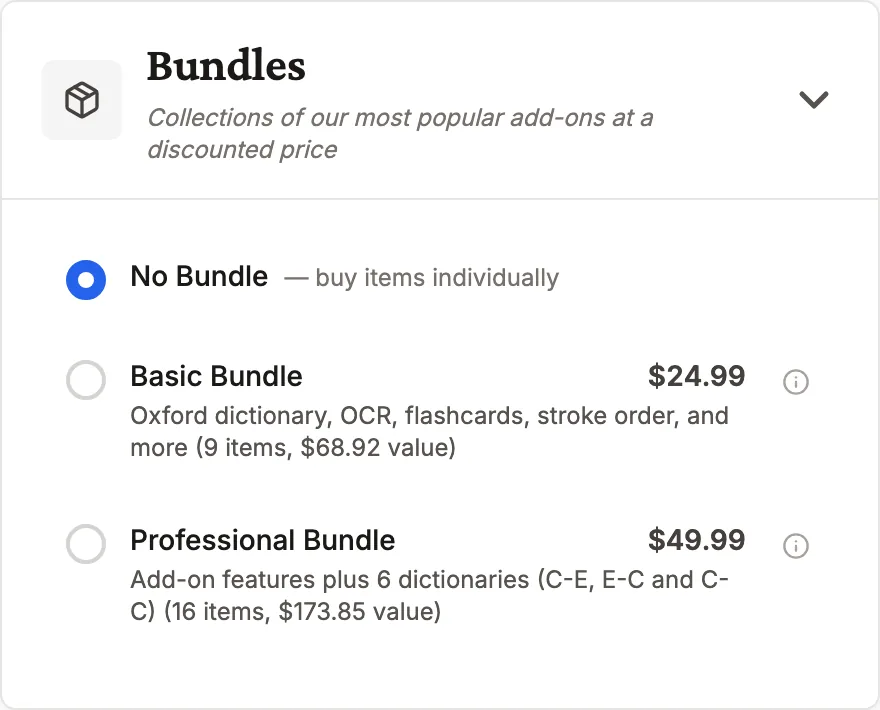
Buying on the website works like buying in the app. You get a Registration ID, type it into Pleco's Registration screen, and your add-ons unlock.
Find the cheapest way to get what you need
Bundles aren't always the bargain they look. If you only want the camera lookup and flashcards, buying the two separately costs less than either bundle. Tick what you'd use and where you'll buy, and our calculator adds up all three ways:
What should you buy in Pleco?
Tick the features you'd use and where you'll buy: we add up the three ways to get them, one by one or in either bundle, from Pleco's own prices.
What would you use?
Where you'll buy
Buy them one by one: $19.98
For $5.01 more, the Basic Bundle also gives you the document reader, full stroke order, recorded audio in two voices, the Oxford dictionary and a Kai font for iPhone.
Three ways to pay on Pleco's website
Option 1. Buy them one by one Cheapest
$19.98
Optical Character Recognizer $9.99 + Flashcard System $9.99
Option 2. Basic Bundle
$24.99
Also includes the document reader, full stroke order, recorded audio in two voices, the Oxford dictionary and a Kai font for iPhone.
Option 3. Professional Bundle
$49.99
Also includes the document reader, full stroke order, recorded audio in two voices, the Oxford dictionary, the ABC dictionary, the Guifan dictionary, three more dictionaries, a better voice for sentences and two fonts for iPhone.
On Android, the free app already shows simple flashcards; this adds spaced repetition and tests. US prices before tax, checked 11 October 2026.
Sources: Pleco's web store and its US App Store listing, 11 October 2026. Apple lists only Pleco's ten most popular add-ons; for the rest, the in-app total uses the web-store price.
Here's where we would start, by level:
- Beginners, HSK 1 and 2. The free app. Add the Flashcard System only if you want Pleco to schedule your reviews.
- Reading real texts, HSK 3 and 4. The Basic Bundle. The reader and camera lookup pay off once you read menus, signs and articles.
- Advanced, HSK 5 and up. The Professional Bundle, for the ABC's detail and Guifan's definitions in Chinese.
- Cantonese learners. Start with the free Cantonese readings and audio, then add the ABC Cantonese Dictionary if you need more.
There's no rush. Pleco says people who bought dictionaries for their Palm Pilots in 2001 still use them on new phones, so you can start free and buy later.
The camera lookup is handy, not magic
Pleco's camera lookup, its OCR add-on, reads Chinese through your phone's camera. Point it at a menu, a sign or a page, and it picks out words and shows each one's dictionary entry. It also works on photos you've taken:
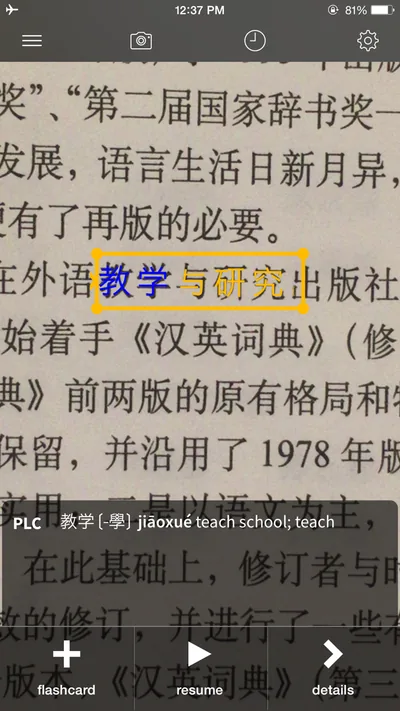
Pleco says it launched the first live Chinese OCR, in 2010, and it's still reworking it. A new recognition engine arrived as an option on iPhone in October 2025, and Android's got faster in a May 2026 update.
We didn't try it ourselves, and reviewers disagree about accuracy. In 2023, one App Store reviewer found DeepL's free camera translation more accurate and wrote: "I seriously paid for something that is worse than a free app."
So before you pay, try what your phone already has. Apple's Live Text reads Simplified and Traditional Chinese for free, and Google Translate has a camera mode. What they don't give you is Pleco's dictionary entry, audio and a one-tap flashcard for every word.
Our advice: buy it if you read printed Chinese often. For the odd sign, the free tools will do.
Flashcards are powerful, but paid on iPhone
Pleco's flashcards grow out of the dictionary: one tap on any entry makes a card. You can also install ready-made lists, including the 2026 HSK 3.0 vocabulary. When we checked Pleco's 2026 HSK word file for our guide to HSK books, it matched the official syllabus word for word at levels 1 to 6.
What you get for free depends on your phone. On iPhone, saved words are only bookmarks: Pleco's manual says testing stays switched off until you buy the Flashcard System. On Android, you can test yourself for free, but cards come up at random and Pleco doesn't track how well you know them.
The paid Flashcard System adds spaced repetition, tone drills, multiple choice and handwriting tests. It schedules each card by a score: by default, a card scored 300 comes back in three days.
Some App Store reviewers find all those options hard to learn. Our comparison of Chinese flashcard apps sets Pleco against Anki, Skritter and Hack Chinese, with a simulator for your daily reviews.
If Pleco is already your dictionary, we think its flashcards take the least effort: every lookup is one tap from a card.
Drawing characters is free on both phones
Handwriting lookup comes with the free app on iPhone and Android. Draw a character anywhere on the screen and pick it from the matches. Pleco says its recognizer copes well with stroke-order mistakes.
On iPhone, an enhanced recognizer costs $9.99. Pleco's current bundle pages don't list it, so treat it as a separate purchase.
Stroke-order animations are free for 500 characters, and the $3.99 add-on covers about 28,000. Writing practice itself lives in the flashcards, whose fill-in-the-blank tests ask you to draw each character.
Try the free pad first. Pay for the enhanced recognizer only if it keeps misreading your writing.
iPhone and Android get different free versions
Pleco is the same app on both platforms, but we found the details differ. Android's free version does more, and the iPhone version has a few extras of its own:
| iPhone and iPad | Android | |
|---|---|---|
| Free flashcards | Save words only | Simple cards, no scores |
| Look up words in other apps | Copy text into Pleco | Free floating button |
| Files the paid reader opens | PDF, EPUB, Word, text, web pages | PDF, EPUB, text |
| Free word audio | The phone's voice | Recorded syllables |
| Send cards to Anki | No | Yes, to AnkiDroid |
| Flashcard sync | iCloud | Manual backups |
| Extra Chinese fonts | Kai and Xing, $4.99 each | None |
| 2026 HSK 3.0 cards | Since 12 August 2026 | Since 21 May 2026 |
Sources: Pleco's product pages, manuals for iPhone and Android, web store and store listings, checked 11 October 2026.
Either way, you pay once. Since 2018, your Registration ID unlocks your add-ons on both platforms, on up to three devices at a time.
Both versions are well rated, at 4.7 stars on the US App Store and 4.6 on Google Play.
Who Pleco suits, and who should skip it
We would pick Pleco if:
- You read Chinese, at any level. Every way to look a word up is here: pinyin, English, drawing and, with the add-on, the camera.
- You use Traditional characters or Zhuyin. Every part of the app supports both scripts, and Zhuyin as well as pinyin.
- You're learning Cantonese too. It shows Jyutping readings and sells Cantonese dictionaries and voices.
- You don't want another subscription. Add-ons are bought once, and Pleco has never charged for a version upgrade.
- You travel. Once it's set up, it works with no connection.
We would skip it, or pair it with something else, if:
- You want a course. Pleco has no lessons or learning path.
- You want to speak. Nothing in it talks back or checks your pronunciation.
- You need whole sentences translated. An App Store reviewer in January 2026 found it "best for single words."
- You study on a computer. There's no desktop version yet, though Pleco says a Mac app comes first.
Longtime learners find it hard to replace. In a January 2026 Chinese-Forums thread asking what's better than Pleco, most posters still used it, adding other tools alongside. One member learning Japanese wrote that "there isn't a Pleco equivalent which is half as good."
Pleco is still on version 3.2, which it has kept updating since at least 2017. Pleco 4.0, a long-awaited update, has been in beta on iPhone since late 2023.
If you read Chinese, install it. If you want to speak it, you'll need something else as well.
The best alternatives to Pleco
No single app replaces all of Pleco, but several cover its main jobs for less, or on a platform Pleco doesn't. We compared them using each app's own listing:
Pleco
- Price
- Free; add-ons from $2.99, paid once
- Works on
- iPhone, iPad, Android
- Best for
- All of it in one app
Hanping
- Price
- Free; add-ons $4.99–$19.99
- Works on
- Android, and iPhone since December 2025
- Best for
- A clean offline dictionary
KTdict
- Price
- Free with ads; $3.99 to unlock
- Works on
- iPhone, iPad, Mac
- Best for
- Camera lookup and flashcards, cheaply
trainchinese
- Price
- Free dictionary; plans from $11.99 for 3 months
- Works on
- iPhone, Android
- Best for
- Word lists and flashcards
MDBG
- Price
- Free
- Works on
- Any web browser
- Best for
- Lookups on a computer
Zhongwen
- Price
- Free
- Works on
- Chrome
- Best for
- Hover lookups on websites
Sources: each app's App Store, Google Play or Chrome Web Store listing or website, checked 11 October 2026.
Hanping has been an Android favourite for years, and its developer has built it alone for over 17. It's fully offline, with handwriting and native-speaker audio, but its listing doesn't mention camera lookup. Its iPhone app is new, with only a handful of ratings so far.
KTdict is the cheapest way we found to get camera lookup and spaced-repetition flashcards in one app. It's Apple-only and needs iOS 26 or later. The trainchinese app has a free dictionary and adds camera lookup for $4.99 on iPhone, but heavier flashcard use needs a plan.
MDBG and Zhongwen cover your computer. MDBG is a free website built on CC-CEDICT, and Zhongwen shows definitions as you hover over Chinese in Chrome. For a desktop program, Wenlin has a free edition for Mac and Windows.
Some posters in that Chinese-Forums thread now ask AI chatbots to explain words and grammar, too.
Our pick: on an iPhone with iOS 26, try KTdict if you want the camera and flashcards cheaply. Otherwise, Pleco's free app plus one or two add-ons is the setup to beat.
Where SayMei fits
SayMei isn't a dictionary, and it doesn't replace Pleco. It covers the part Pleco leaves out: speaking. In lessons with Mei Lin, you use new words out loud in conversation, and she corrects your tones and grammar as you go.
We also publish free word pages, with pinyin, meanings and example sentences for words like almost, 几乎. Our flashcards are free for up to 10 words a day.
Where we lose to Pleco:
- No dictionary app. There's no handwriting or camera lookup, and SayMei runs only online, in a web browser.
- A subscription. Premium is $5.99 a month, where Pleco's add-ons are paid for once.
- No reader for your own files. You can't open your own PDFs or e-books in SayMei.
What to do next
- Install the free app first. Use it for a week or two before you buy anything.
- Buy single features if you want one or two. A bundle pays off once you want the camera, flashcards and reader together.
- Buy bundles on Pleco's website. It's cheaper there, and the add-ons work the same.
- Try your phone's camera before paying for OCR. Live Text or Google Translate may be all you need.
- Pair it with speaking practice. A dictionary helps you understand Chinese; talking is how you learn to answer.
For the flashcard side, read our comparison of Anki and the Chinese flashcard apps.
FAQ
Is Pleco free?
Yes. The app is free on iPhone, iPad and Android, with no ads and no subscription. It includes two Chinese-English dictionaries, handwriting lookup, audio, a clipboard reader and stroke order for 500 characters, and it works offline. Paid add-ons, such as the $9.99 camera lookup and flashcards, are one-time purchases, and you can use Pleco for years without buying any.
What's the difference between Pleco's Basic and Professional bundles?
The Basic Bundle has the camera lookup, flashcards, document reader, full stroke order, recorded audio, a Kai font and the Oxford Chinese Dictionary. The Professional Bundle adds five dictionaries, including the ABC Chinese-English and the Chinese-only Guifan, plus a Xing font and a better male voice. On Pleco's web store they cost $24.99 and $49.99; in the app, $29.99 and $59.99.
Is there a cheaper alternative to Pleco?
For most people, the free Pleco app is already the cheapest option. If you want camera lookup and spaced-repetition flashcards, KTdict unlocks both for a one-time $3.99 on iPhone, iPad and Mac, though it needs iOS 26. On Android, Hanping is a well-rated free dictionary with paid extras from $4.99. MDBG is free in any web browser.
Is there Pleco for PC or Mac?
Not yet. Pleco runs on iPhone, iPad and Android. Its FAQ says a Mac version will come first, with Windows probably later, and the Android app already runs on Chromebooks. Until then, MDBG's free website or Wenlin's free desktop edition can fill in on a computer, and the Zhongwen extension adds pop-up definitions in Chrome.
Does Pleco work offline?
Yes. You need an internet connection to install the app and download add-ons, but after that, Pleco says every feature works offline, including the dictionaries, handwriting and camera lookup. That makes it useful on a plane, or abroad without a data plan. Only buying and downloading new add-ons needs a connection again.
Can I use my Pleco purchases on both iPhone and Android?
Yes. Since June 2018, Pleco licences haven't been tied to a platform. Copy the Registration ID from Pleco's Registration screen on one device and enter it on the other. One purchase works on up to three devices at a time, on any platform or account. Pleco doesn't use Apple's Family Sharing; the Registration ID does that job instead.
Does Pleco have spaced repetition?
Yes, in the paid Flashcard System, which costs $9.99 once. It schedules reviews by each card's score and adds tone drills, multiple choice and handwriting tests. Without it, iPhone users can only bookmark words, and Android's free flashcards show cards in random order. Premade lists include the 2026 HSK 3.0 vocabulary.
Can Pleco translate whole sentences?
Not really. Pleco is a dictionary: paste a sentence into its reader and you can tap each word for its meaning, but it won't write a translation for you. For a whole sentence, use a translator such as Google Translate, then check the key words in Pleco. An App Store reviewer put it simply: it's best for single words.
Sources
Checked 11 October 2026 unless noted. No accounts were created and nothing was bought.
Pleco
- Pleco's web store: every add-on, bundle and graded reader with its price, what each bundle contains, and each dictionary's description
- Pleco on the App Store: in-app prices, ratings, version history (3.2.83, 12 August 2026) and listing screenshots
- Pleco on Google Play: features, ratings, downloads and the 21 May 2026 update notes
- Pleco's product pages, iPhone pricing and bundles, Android pricing, how to buy on iPhone and on Android, and licence transfers
- Pleco's FAQ: offline use, Pleco 4.0, the Mac version, Family Sharing
- Pleco's manuals: iPhone flashcards, Android flashcards, iPhone manual and Android manual, including version histories
- Pleco news: Direct Sales on iOS (14 May 2025) and Pleco 4.0 Beta (29 November 2023); About Pleco
Alternatives
- Hanping on Google Play and the App Store
- KTdict and trainchinese on the App Store
- MDBG; Zhongwen on the Chrome Web Store; Wenlin's products
- Google Translate on the App Store; Apple's feature availability page, for Live Text languages
Learners
- Chinese-Forums, "What's better than Pleco and Anki these days?" (January to April 2026)
- Reviews on Pleco's App Store and Google Play listings
SayMei
- Pricing; flashcards; our guides to HSK books and Chinese flashcard apps
Methods
Everything here comes from public pages read on 11 October 2026: Pleco's website, web store, FAQ and manuals; its App Store and Google Play listings, with their version notes and the in-app prices Apple shows; each alternative's own listing; a Chinese-Forums thread; and store reviews. We didn't buy add-ons or create accounts, so what Pleco says a feature does is reported as its claim.
- Prices are US dollars before tax. Web-store prices come from Pleco's store. In-app prices come from the US App Store, which lists Pleco's ten most popular add-ons; where Apple shows no price, the calculator uses the web store's.
- Bundle totals add up the web-store price of every add-on Pleco lists inside each bundle, and match the totals Pleco's store shows.
- Dictionary sizes are Pleco's own entry counts, from each dictionary's description.
- Screenshots: the two app screens are Pleco's own App Store images, which show an older version of iOS, so today's app may look different. The store and App Store price lists are our captures of public pages, taken without signing in.
- Reviews: we read the 400 most recent US App Store reviews that Apple's public feed returned, from December 2016 to October 2026, and the reviews shown on Pleco's Google Play listing. Quotes are short and unedited.
- The Mandarin example was checked against the CC-CEDICT dictionary.
If you spot a mistake, tell us: we fix errors.