Skritter review: is the handwriting app worth it?
Skritter checks every stroke you write. What that teaches, $99.99 a year, how its HSK decks match the December 2026 exam, and when Anki or Pleco is better.

Most flashcard apps ask you to recognise a Chinese word. Skritter makes you write it from memory and checks every stroke. That's why it works, and why it takes time.
This review is for you if you're deciding whether to pay for Skritter. We read its help pages and store listings, went through its free web demo, and compared its HSK decks with the new exam's lists.
Key takeaways
- Writing from memory works. In studies of adult learners, handwriting helped people remember what characters look like and mean.
- Every word becomes up to four cards. Writing, tone, pinyin and meaning are scheduled separately, so your daily reviews multiply.
- Its HSK 3.0 decks follow the 2021 lists. The new exam uses a newer syllabus, and Skritter says updated decks are a priority.
- The yearly plan is the one to buy. It costs less than seven months of the monthly plan.
- If you only want to read, start with Anki or Pleco. Both charge once, and neither makes you write.
- Skritter teaches characters, not Chinese. There's no grammar course, and nothing in it hears you speak.
You learn each character by writing it
Skritter's method fits on one screen, as we saw in its demo. The word's pinyin and meaning sit at the top, and below them is a square where you write with your finger or a stylus.
We went through Skritter's free web demo, which needs no account, on 11 October. It teaches you the word for Chinese, 中文, in eight short steps:
- Trace. You write each stroke over a faint outline, and a dot shows where the next one starts.
- Write from memory. The outline goes. A reveal button flashes the character's outline, and a teaching button replays the stroke order.
- Get graded. A finished character turns green when it's right and red when it isn't. You swipe up to erase and try again.
- Answer the other cards. A meaning card, a tone card and a pinyin card follow. You grade yourself on the meaning; the app checks the tone and the pinyin.
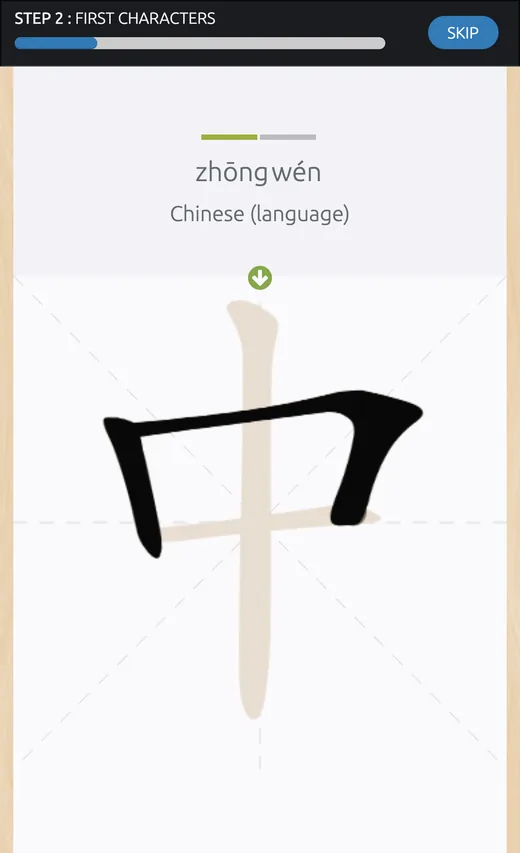
The canvas is strict about order. When we wrote the last stroke of middle, 中, first, Skritter didn't accept it. Each correct stroke snapped into a clean, brush-like line.
If the snapping feels too kind, two settings make it harder. Raw squigs shows your strokes exactly as you drew them, and rawest squigs turns off grading so you mark yourself, as you would on paper.
Here's the rest of what we found on Skritter's own pages:
| Skritter | |
|---|---|
| Card types | Writing, tone, pinyin and meaning |
| Decks | 700+ official decks, plus your own |
| HSK decks | HSK 1–6 for the old exam; HSK 1–9 on the 2021 lists |
| Works on | iPhone, iPad, Android and the web |
| Free | A few decks; reviews need Premium |
| Price | $14.99 a month or $99.99 a year |
| Ratings | 4.7 on the App Store, 4.5 on Google Play |
Source: Skritter's website, help pages and US store listings, checked 11 October 2026.
To us, it's a specialist tool. Everything in it serves one goal: getting characters into your hand and your memory.
Writing by hand helps you remember
Skritter began in 2008 as a website for learning to write characters. The research backs its core idea, with one catch.
In experiments with adult learners, writing characters by hand helped people recognise them and link them to meanings, more than reading alone did. Typing pinyin helped only with the sounds.
A review of the research from 2021 found the same split. Handwriting builds memory for a character's shape and meaning; typing builds memory for its sound.
Here's the catch: writing is slow, and it isn't the fastest road to reading. In one study, reading practice beat writing for remembering meanings and sounds. In a 2026 experiment, beginners who typed recognised more characters, while those who wrote by hand remembered meanings better.
Our take: write by hand if you want to write, or if similar characters keep blurring together. If you only need to read and type, we think you can learn faster without it.
Every word becomes four cards
Skritter splits each word into separate cards: one to write it, one for its tone, one for its pinyin and one for its meaning. Each card has its own schedule, so you can know a word's meaning cold and still miss its tone.
We like how thorough that is. It also multiplies your work: ten new words a day are forty new cards.
Skritter publishes how far apart it spaces a card you keep getting right:
Source: Skritter's guide to its spaced repetition, its interval table for new items.
Miss a card and it starts over. Skritter's grading guide says Forgot resets a card "as if it was brand new".
The help page still says no gap grows past a year. In August, staff wrote on Skritter's forum that the cap went up to ten years in 2025.
Skritter also sets a high bar: its help pages call 95% recall "a good target". The app has no setting to lower it; only the website does.
That costs reviews. In our flashcard model, a 95% goal meant about 60% more of them than Anki's default goal.
Set your own pace to see what that means for your day:
How many Skritter cards a day?
Pick your pace and the cards you'd study: you get the reviews Skritter would bring back each day, and the time they take, from the spacing Skritter publishes.
New words a day
Card types
Characters
Your recall
Seconds a card
20 new cards a day. After three months, about 100 reviews a day: 30 min.
| When | Reviews a day | Time a day |
|---|---|---|
| After a month | 70 | 23 min |
| After three months | 100 | 30 min |
| After a year | 135 | 39 min |
Writing cards only: about 25 reviews and 7 min a day after three months.
Skritter's published spacing, if you remember 95% of cards when they're due, at 15 seconds a card. A missed card starts again, and learning a new character takes longer than a review.
Sources: Skritter's help pages (its interval table, card types and 95% recall target) and its forum; answer times from the FSRS project's Anki data and one Skritter learner's report. A model, not a forecast: real queues also hold cards you added in a burst or skipped.
At five new words a day with all four card types, that's about 100 reviews a day after three months, at Skritter's 95% target.
At 15 seconds a card, that's half an hour, every day.
Learners who use it daily report the same. One Reddit learner near HSK 5 says the daily cards take "probably 1.5 hours a day".
Our advice: add fewer words than you think you can manage, and switch off the card types you don't need. Skritter lets you study writing alone, or skip tones.
Tone cards make you commit
After the writing, we think tone cards are Skritter's best idea. You draw each syllable's tone: a flat line for the first tone, a rise for the second, a dip for the third and a fall for the fourth. You tap a dot for the neutral tone.
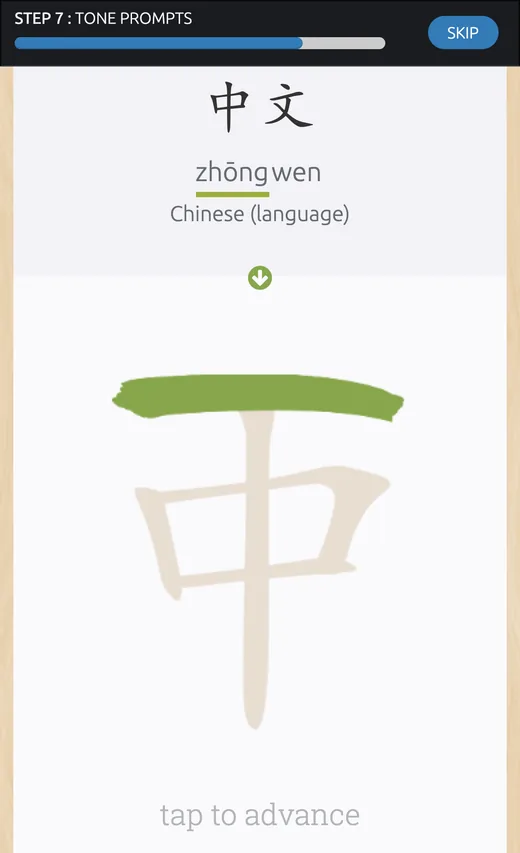
Since version 4.0 in September, you can also tap tone buttons under the canvas instead of drawing. Either way, you have to produce the tone rather than pick it from a list, and recalling an answer teaches more than recognising one.
Tone cards are also where reviews pile up. A learner with about 1,040 words wrote on Reddit that most of their 100-plus daily cards were tone cards.
One thing they can't do is hear you. A tone card checks that you remember a tone, not that you can say it.
The HSK decks predate the new exam
Skritter has two sets of HSK word-list decks: the old exam's HSK 1–6 lists, and HSK 3.0 decks it built in June 2021 from that year's standard. The exam that starts on 13 December 2026 uses a newer list, the syllabus published in November 2025.
We compared the two lists word by word. Here's how much of the new exam's vocabulary the 2021 decks cover:
Source: our comparison of CLEC's 2025 syllabus with the 2021 standard's lists from Chinese Testing International. Covered is the share of the new list's words found in the 2021 decks up to the same level.
We found most of the new exam's words there, about seven in eight by HSK 4. But you'd also study about 1,500 words the new HSK 1–4 doesn't list.
The handwriting decks match even less. The new syllabus names its characters to write by hand, 书写字, and so did the 2021 standard. Both lists have 1,200 characters, and they share only about half of them.
Here's where the new exam's handwriting characters sit in Skritter's 2021 decks:
Source: our comparison of the 2025 syllabus's handwriting list with the 2021 standard's, which Skritter's handwriting decks follow. The other 30 HSK 4 characters are in its HSK 7–9 deck.
We checked the other way too. Of the 300 characters in the HSK 1–3 handwriting deck, 171 aren't on the new exam's handwriting list at any level, including eat, 吃, and water, 水.
We don't think this makes the 2021 decks bad. Their words are common and worth knowing, and you'll still want to write 吃. But for the new exam, study from the 2025 lists.
Skritter said on 24 September that 2026 editions of its HSK decks, with writing decks, are now a priority. Until they arrive, you can paste the official list into a custom deck, or use our free HSK word lists to check what each level needs.
You can study almost any textbook
In our view, Skritter's real strength is its library. Its App Store page promises more than 700 official decks, and its website counts over 12,500 lists, including ones learners made.
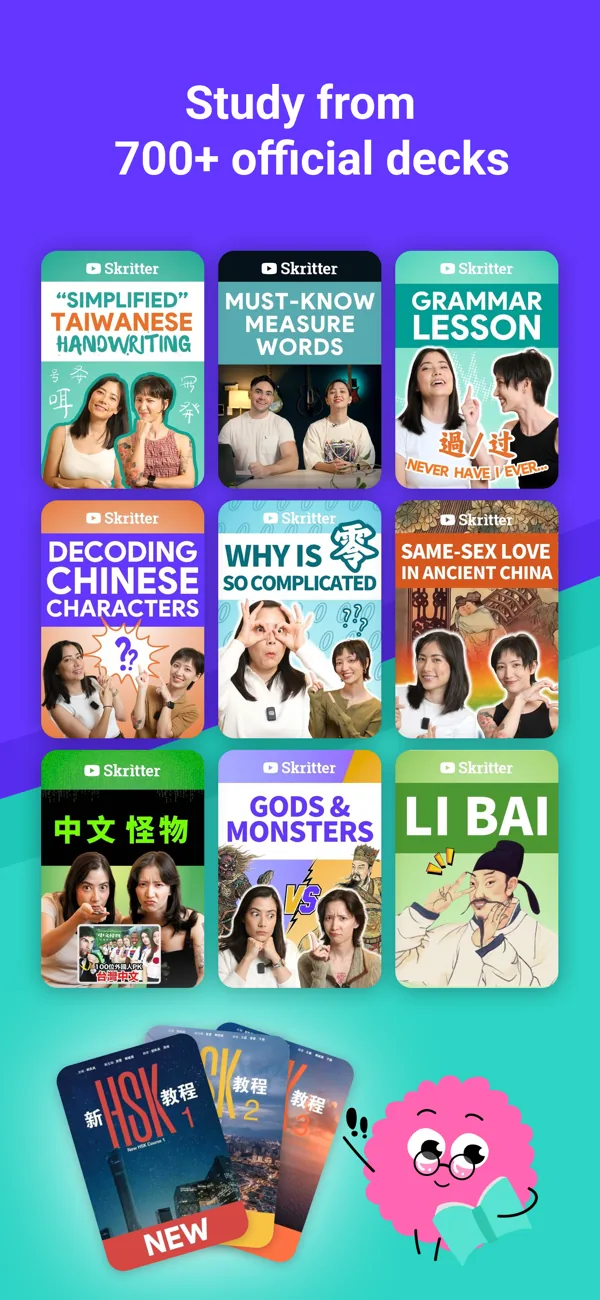
If your class uses a textbook, there's probably a deck that follows it chapter by chapter. Skritter's staff say decks for the new official HSK course books, levels 1 to 3, are already in the app, with 4A and 4B on the way.
You can build your own decks too, or let words flow in from reading apps. Du Chinese, Maayot and The Chairman's Bao send words from their stories into Skritter decks, and LingQ joined in July. Pleco has no direct link: you export your bookmarks and paste them in.
If you're in a class, we think this is the best reason to pay. Your homework list is probably already there.
The yearly plan is the one to buy
Skritter Premium is a subscription, and the longer you commit, the less each month costs:
| Plan | Price | Per month |
|---|---|---|
| Monthly | $14.99 | $14.99 |
| 6 months | $59.99 | $10.00 |
| Yearly | $99.99 | $8.33 |
Source: skritter.com, checked 11 October 2026. Each plan starts with a 7-day free trial.
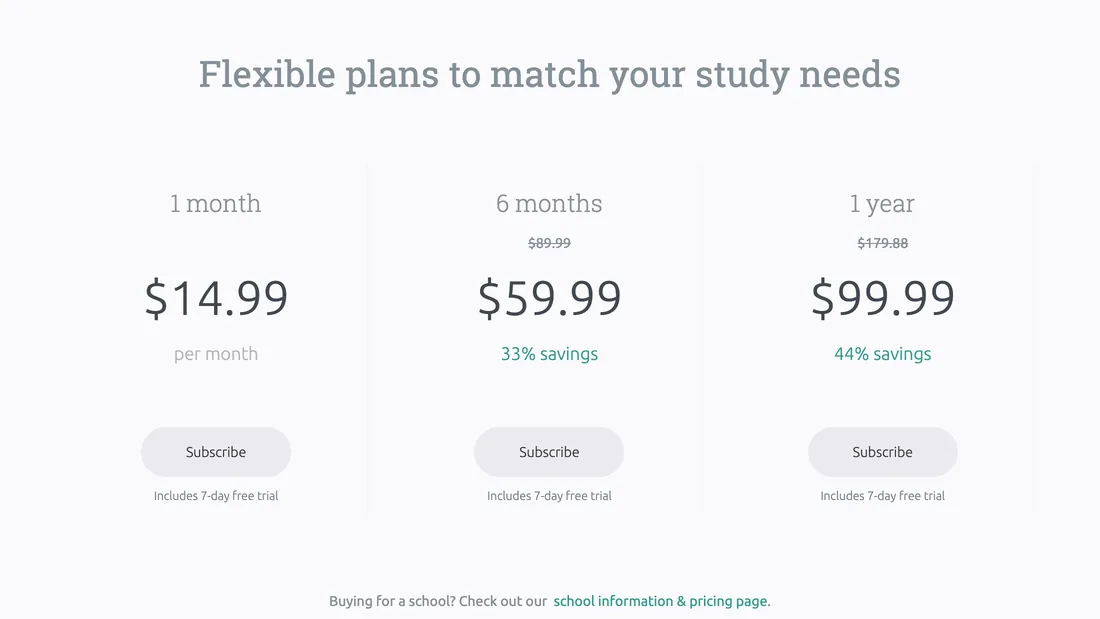
The yearly plan costs less than seven months of the monthly one. If you'll use Skritter for more than half a year, it's the plan we'd buy.
Over time, the gap with apps you buy once keeps growing:
Sources: skritter.com, Pleco's bundles page and the App Store, checked 11 October 2026. Anki is also free on computers. Neither Pleco nor Anki checks your strokes, so this isn't like for like.
Before you pay, we'd check what's free. Guest accounts can study a few decks for as long as they like, but spaced-repetition reviews need Premium. If a subscription lapses, you can still test yourself on words you've learned, but you can't add or review new cards.
Two more things. In the apps, Apple and Google also list other Premium prices, from $9.99 to $119.99, so check the price before you subscribe. And there's no lifetime plan: learners asked for one on Skritter's forum in June, with no reply.
Teachers can buy a class licence instead. Skritter's schools page prices one at $450 a year for up to 30 students.
When Anki or Pleco is the better buy
Anki and Pleco also review Chinese words on a schedule, and both charge once. Neither checks your strokes the way Skritter does.
Here's how the three compare for characters:
Price
- Skritter
- $99.99 a year
- Anki
- Free; $24.99 on iPhone
- Pleco
- Free; flashcards $29.99
Handwriting
- Skritter
- Checks every stroke
- Anki
- You mark yourself
- Pleco
- Checks the whole character
Tones
- Skritter
- Draw or tap each tone
- Anki
- Tone colours with an add-on
- Pleco
- A tone quiz
HSK lists
- Skritter
- 2021 lists; new decks promised
- Anki
- Free decks, including the 2025 lists
- Pleco
- The 2026 HSK 3.0 lists
Setup
- Skritter
- None
- Anki
- An evening
- Pleco
- A little
Sources: each app's website, manual or store listing, checked 11 October 2026, and our comparison of Chinese flashcard apps.
Here's how we'd choose, depending on what you want checked:
- Pick Anki if you want free, flexible reviews and don't need your strokes checked. The free xiě hànzì deck covers the 2025 HSK lists, with a stroke-practice grid on each card.
- Pick Pleco if it's already your dictionary. Its flashcards can ask you to write a word into its handwriting recognizer, which checks the character but not each stroke. Our Pleco review covers the rest.
- Pick Skritter if you want every stroke checked and the scheduling done for you.
Who Skritter suits, and who should skip it
We'd pick Skritter if:
- You want to write by hand. For a class, an exam with handwriting, or the pleasure of it.
- You study from a textbook. Your chapter lists are probably ready-made.
- Similar characters keep blurring together. Writing makes you notice every part. Our guide to Chinese radicals shows which parts matter most.
- You'll study most days. The schedule only works if you keep up.
We'd skip it, or pair it with something else, if:
- You mainly want to speak. Skritter never hears you.
- You only need to read and type. Anki or Pleco reviews words without the writing, and charges once.
- You want the new HSK lists today. Build a custom deck, or wait for Skritter's new decks.
- You want one app for everything. There's no grammar course and no conversation.
One learner who memorised about 1,200 characters with it put the gap plainly: it "makes me memorize the characters but not the pronunciation".
Where SayMei fits, and where it doesn't
SayMei isn't a handwriting app. We teach Chinese mainly through spoken lessons with Mei Lin. But two of our free tools overlap with Skritter:
- Writing practice. Our worksheet generator has a Practice tab: you watch a character, trace it twice and write it from memory, and it checks every stroke. It's free, with no sign-up.
- The new exam's handwriting list. Our HSK handwriting page lists all 1,200 characters on the 2025 list, by level, with sheets to print.
Where we lose to Skritter:
- No tone, pinyin or meaning cards. Our writing practice is characters only; Skritter drills all four.
- Progress stays in one browser. There's no account sync and no app.
- No textbook decks. You type or pick the characters yourself.
- A simpler schedule. Ours has two grades and basic spacing; Skritter also adjusts for cards you keep missing.
Where we're strongest is speaking, the one skill Skritter never trains.
What to do next
- Try Skritter's demo first. It takes about five minutes and needs no account.
- Choose your card types. Switch off tones or pinyin if they aren't your goal.
- Start with a few words a day. Watch your reviews for a month before adding more.
- Use the 2025 lists for the new exam. Make a custom deck until Skritter's new decks arrive.
- Read and speak the words too. Writing holds characters in memory; using them makes them yours.
For the rest of your toolkit, see the best apps to learn Chinese.
FAQ
Is Skritter worth it?
It is if you want to write Chinese characters by hand and will study most days. Skritter checks every stroke you write and schedules each word's writing, tone, pinyin and meaning cards for you. It's less worth it if you only want to read or speak: Anki and Pleco review words for a one-off price, and Skritter never hears you speak. Premium costs $99.99 a year.
Is Skritter free?
Partly. Guest accounts can study a few free decks for as long as they like, but spaced-repetition reviews need Premium. Each paid plan starts with a 7-day free trial. After that, Premium costs $14.99 a month, $59.99 for six months or $99.99 a year on Skritter's website. Its free web demo needs no account at all.
Is there a cheaper alternative to Skritter?
Yes, if you can live without stroke-by-stroke grading. Anki is free on computers and Android, and the free xiě hànzì deck covers the 2025 HSK lists with a stroke-practice grid. Pleco's flashcards cost $29.99 once and check whole characters you write. SayMei's free worksheet generator checks every stroke, but it has no decks or tone cards.
Is Skritter better than Anki for Chinese characters?
For handwriting, yes. Skritter checks each stroke, teaches stroke order and drills tones with no setup. Anki doesn't check handwriting at all, but it's free on computers and Android, $24.99 once on iPhone, and far more flexible. If you just want to recognise characters, Anki does the job for much less. Some learners use both: Anki for words, Skritter for writing.
Does Skritter have the new HSK 3.0 lists?
Not yet for the new exam. Skritter's HSK 3.0 decks, released in June 2021, follow the 2021 standard, while the exam starting on 13 December 2026 uses the syllabus published in November 2025. Its staff said on 24 September that 2026 editions, with writing decks, are now a priority. Decks for the new official HSK course books, levels 1 to 3, are already in the app.
How many Skritter reviews a day is normal?
It depends on how many new words you add. Each word can become four cards, and even a card you never miss comes back four times in its first three months. At five new words a day with all four card types, expect about 100 reviews a day after three months. One learner near HSK 5 reports 200 to 350 cards a day.
Do I need to learn to write Chinese characters by hand?
Not to read or type, but it helps you remember characters, and some exams ask for it. In studies of adult learners, handwriting strengthened memory for a character's shape and meaning. The new HSK lists 1,200 characters to write by hand, starting at HSK 2, where you write characters from their pinyin. If you only need to read, reading and typing practice is faster.
Does Skritter work for traditional characters?
Yes. You can study simplified, traditional or both, though both roughly doubles your reviews. Zhuyin can replace pinyin, and there's a Taiwan Ministry of Education font. One catch: automatic grading is based on a simplified-style font, so writing in the Taiwan style means grading yourself. Skritter also uses mainland pronunciations throughout.
Sources
Checked 11 October 2026 unless noted.
Skritter
- Skritter home page and plans, features, about and schools
- Free web demo, which needs no account
- Help pages: spaced repetition, grading buttons, vocabulary FAQ, mobile settings, writing modes, mobile billing, simplified and traditional characters, standard references, partner integrations, importing from Pleco and what's new
- Forum: HSK 3.0 (2021) decks (29 June 2021), new HSK lists (to 24 September 2026), interval cap, active development and long-term discounts
- Skritter on the App Store (version 4.0.1, 22 September 2026) and Google Play
- Skritter blog: native-speaker audio for HSK 1–4 (2020) and LingQ integration (July 2026)
HSK lists
- CLEC, HSK exam syllabus (November 2025): words and handwriting characters by level
- The 2021 standard, GF 0025-2021: words from Chinese Testing International's Standard Query database; handwriting characters from the Ministry of Education's PDF, as transcribed by elkmovie/hsk30 and krmanik/HSK-3.0
- Exam dates and formats: our HSK 3.0 guide
Other apps
- Pleco bundles, Pleco flashcards manual and Pleco on the App Store (version 3.2.83, 12 August 2026)
- AnkiMobile on the App Store and Anki
- Anki xiě hànzì decks
- Our comparison of Chinese flashcard apps (8 October 2026)
Research
- Guan, C. Q., et al. (2011). Writing strengthens orthography and alphabetic-coding strengthens phonology in learning to read Chinese. Journal of Educational Psychology 103(3). https://doi.org/10.1037/a0023730
- Lyu, B., Lai, C., Lin, C.-H., & Gong, Y. (2021). Comparison studies of typing and handwriting in Chinese language learning: A synthetic review. International Journal of Educational Research 106. https://doi.org/10.1016/j.ijer.2021.101740
- Xu, Y., Chang, L., Zhang, J., & Perfetti, C. A. (2013). Reading, writing, and animation in character learning in Chinese as a foreign language. Foreign Language Annals 46(3). https://doi.org/10.1111/flan.12040
- Shi, Q., Hu, B., & Zhu, Z. (2026). Orthography-sound vs. orthography-meaning mapping in Chinese character learning: Evidence on typing and handwriting. Foreign Language Annals 59(2). https://doi.org/10.1111/flan.70053
- Rowland, C. A. (2014). The effect of testing versus restudy on retention. Psychological Bulletin 140(6). https://doi.org/10.1037/a0037559
Learners
- Reddit, r/ChineseLanguage: Skritter reviews are so huge; resources for learning to write; is Skritter Premium worth it?; writing apps other than Skritter
SayMei
Methods
Everything here comes from public pages read on 11 October 2026: Skritter's website, help center, blog and forum; its US App Store and Google Play listings; its free web demo; Anki's and Pleco's pages and manuals; published research; and Reddit threads. We didn't subscribe or create an account, so what Skritter says Premium does is reported as its claim.
The demo. We went through Skritter's demo in a browser with no account, at desktop and phone widths, writing the strokes from open stroke data. We stopped at the sign-up form. The two demo pictures are our captures; the deck picture is Skritter's own, from its App Store listing.
HSK decks. We couldn't open Skritter's decks without an account, so we compared the lists they were built from. The 2021 standard's 11,092 words come from Chinese Testing International's database, and the 2025 words from CLEC's syllabus, as in our HSK 3.0 guide. We matched written forms, split the 2021 list's variant entries and matched erhua forms, such as play, 玩儿 and 玩. Shares use distinct written words. The 2021 handwriting list comes from two transcriptions of the Ministry of Education's PDF, which differ by one character.
The workload tool. A card follows Skritter's published spacing while you keep getting it right. A missed card is retried in the same session, then follows the table's after-a-miss row, which we extend at its own ratio of about 2.25. Every review is remembered with the same chance, and every day adds the same number of new cards. It's a model: it leaves out Skritter's small random spread, its timing adjustments and days you skip.
If you spot a mistake, tell us: we fix errors.