Migaku review: is it good for learning Chinese?
Our Migaku review for Mandarin: pinyin and tone colours, the drama sites it works on, its 1,500-word course, every price and what 154 reviewers say.


Almost nine in ten of Migaku's App Store reviews that name a language mention Japanese. If you learn Mandarin, most reviews skip your question: what does it do for Chinese?
This review is for you if you're learning Mandarin and wondering whether Migaku is worth paying for, or whether its course can replace a beginner app. We read Migaku's website, help pages, store listings and prices in November 2026, and every written App Store review from the US, UK, Canada and Australia. We also checked its word-count claim against 33.5 million words of Chinese subtitles.
Key takeaways
- It's a tool for learning from real Chinese. Click a word in a show or on a web page for its pinyin, meaning and an AI explanation, then save it with the line's audio.
- The big Chinese video sites aren't supported. It works on Netflix, YouTube and Viki, but not on iQIYI, WeTV, Youku or Bilibili.
- Its course claim holds up, with a catch. The 1,500 most common words in Chinese films cover more than four words in five, but comfortable viewing takes far more.
- It won't help you speak. Migaku says so itself: it has no speaking features or pronunciation tool, only tone colours, native audio to copy and a listening drill.
- Most reviews that name a language are about Japanese. Only three of the App Store reviews we read are clearly from people learning Chinese with it.
- You pay before you try. The website now offers a 10-day money-back guarantee instead of a free trial, and the iPhone app charges more.
Strong for learning from Chinese media, missing for speaking
Migaku does one job very well: it makes real Chinese easier to read and watch. For a Mandarin learner, the other jobs are done in part, or not at all.
We scored each one from Migaku's own pages and what learners report:
What you need · Verdict · What Migaku gives you
Help reading real Chinese
Strong
Click any word on a web page for pinyin, a meaning and an AI explanation
Learning from shows
Partly
Clickable subtitles on Netflix, YouTube and Viki, but not on iQIYI or WeTV
Remembering what you meet
Strong
One-click flashcards with the sentence, its audio and a screenshot
A start from zero
Partly
A pinyin course, then about 1,500 words and a few hundred grammar points
Help with tones
Partly
Tone colours and a listening drill, but nothing checks your voice
Learning characters one by one
Missing
A characters course for Mandarin is still "coming soon"
Speaking practice
Missing
None, by Migaku's own account
Sources: Migaku's website, FAQ, Chrome Web Store listing and App Store listing, read on 6 November 2026. Each row is explained below.
If you already know some Chinese and want to learn from what you watch and read, we think Migaku is one of the strongest tools you can buy. If you need to speak, plan on a second tool from the start.
It turns Chinese subtitles and web pages into clickable text
We think of Migaku's core as a reading layer. Open a video or web page with it, and it splits the Chinese into words, marks the ones you don't know and lets you click any of them.
Here's what that looks like in the demo on Migaku's Chinese page:
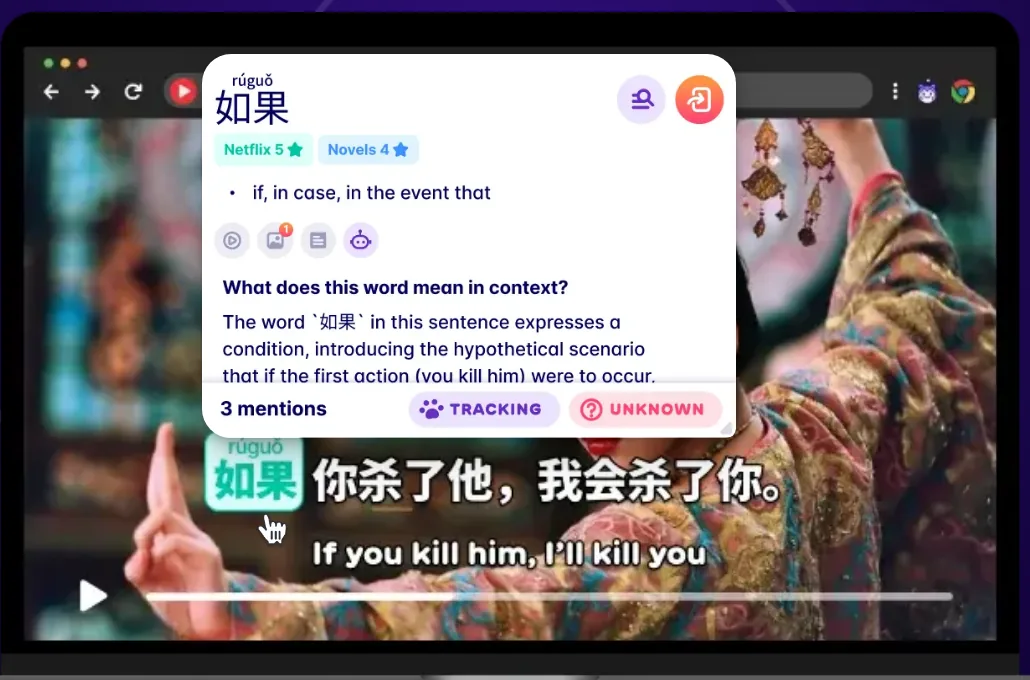
A click shows the word's pinyin and meaning, how common it is on Netflix and in novels, and what it means in this sentence. The demo's word is "if", 如果. Migaku's Chinese page says those explanations come from ChatGPT.
Splitting text into words is the hard part, because written Chinese has no spaces. Take "developing country", 发展中国家. A careless splitter finds "China", 中国, in the middle of it.
From what we read, Migaku manages most of the time, but not always. A Chinese learner on the App Store wrote of "occasional syntax hiccups with Chinese" in December 2025. Chinese has had its own bugs too: in August, Migaku fixed one that showed known Chinese words as unknown.
Four kinds of settings shape how Chinese looks, from Migaku's own video guide and FAQ:
- Pinyin or zhuyin above every word, only above words you don't know, only when you hover, or never.
- Tone colours always, on hover or never: red for the first tone, yellow for the second, green for the third, blue for the fourth and grey for the neutral tone.
- Simplified or Traditional, either way. Migaku converts the text and has dictionaries for both scripts.
- Subtitle modes, including two languages at once, or a pause before each line so you can read it first.
Tone colours help most with words that differ only in tone. Buy, 买, turns green, and sell, 卖, turns blue, so you see a difference you might not hear yet.
Migaku also keeps count of what you know. Every word you meet gets a status, from unknown to known, and each page or video gets a comprehension score: the share of its words you know. Here's its demo on Weibo, China's answer to Twitter:

That score matters more for Chinese than for most languages, because you can't sound out a character you haven't learned. It tells you whether a show is worth the effort before you start.
If you already read some Chinese, we think this layer is the reason to choose Migaku. Every page and episode becomes something you can study.
Five video sites, and the big Chinese ones aren't on the list
Migaku's browser extension works with five video sites: Netflix, YouTube, Disney+, Rakuten Viki and Animelon, an anime site. Its phone apps work with YouTube only, Migaku's FAQ says.
We set that list against the services our dramas guide found carrying Chinese dramas in the US:
| Where Chinese dramas stream | Migaku in Chrome | Migaku's phone apps |
|---|---|---|
| Netflix | Yes | No |
| YouTube | Yes | Yes |
| Rakuten Viki | Yes | No |
| iQIYI | No | No |
| WeTV (Tencent Video) | No | No |
Sources: Migaku's FAQ and Chrome Web Store listing, read on 6 November 2026; the services from our dramas guide, checked on 11 October 2026.
Youku and Bilibili, two more big Chinese video sites, aren't on Migaku's list either. On a site it doesn't support, Migaku can still make the page's text clickable, but a video's subtitles stay plain.
One more limit: the extension is built for Google Chrome on a computer, so Netflix and Viki need a laptop or desktop. On a phone, you get YouTube, with subtitles Migaku makes itself when a video has none.
So we suggest checking where your shows are before you pay. If you watch on Netflix, YouTube or Viki, Migaku fits. If your dramas are on iQIYI or WeTV, you'll get much less from it.
The Mandarin course: pinyin first, then about 1,500 words
Migaku started as a tool for people who could already follow some of a show. Since August 2024, it has had a Mandarin course for people who can't yet, and every plan includes it.
It comes in two parts, according to Migaku's FAQ:
- Mandarin Fundamentals teaches pinyin and the tones, with recordings and videos of native speakers. At 10 cards a day, it takes about a month.
- Mandarin Academy I teaches about 1,500 words and a few hundred grammar points, with one new thing on each card. At the same pace, about half an hour a day, it takes about six months.
Migaku says a person wrote every lesson and a native speaker recorded every sentence. Its pages disagree on the grammar, though, with counts from about 200 to 340 points.
Its store images barely show the course. Here's the one that comes closest, with a Mandarin lesson on the card at the back:
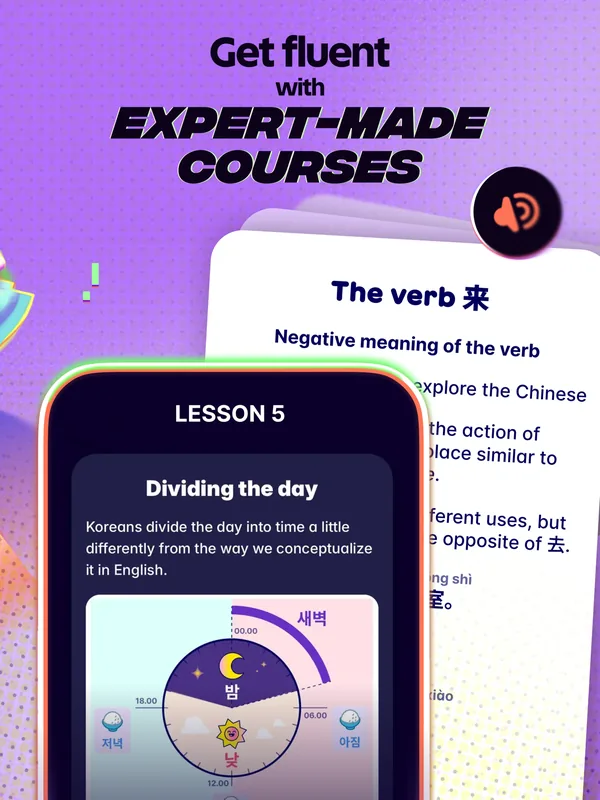
By size, Academy I sits between the new HSK 3 list, about 1,000 words, and HSK 4, about 2,000. Migaku says it isn't meant for HSK preparation, though it claims the course's grammar covers most of what you'd meet up to HSK 5.
Its promise is about shows instead. Migaku says these 1,500 words let you recognise four words in five in modern media. We checked that against SUBTLEX-CH, a collection of 33.5 million words from Chinese film and TV subtitles:
Source: our count on SUBTLEX-CH, 33.5 million words of subtitles from 6,243 films and TV programs. Migaku doesn't publish its word list, so this is the best case for a course of each size.
So the claim holds up in our count, with room to spare. The catch is what 85% means: about one word in seven is still new. Our dramas guide uses 95% as the line for comfortable viewing, and that takes about 7,000 words.
The order matters too. The new HSK 1 to 4 list, almost 2,000 words, covers only 79% of the same subtitles, less than the 1,000 most common words do. Exam lists aren't built from TV, and Migaku's course is.
Three gaps remain for Chinese learners. The courses teach Simplified characters only. The companion course for characters, which Migaku offers for Japanese, is still "coming soon" for Mandarin, so nothing teaches you to write. And Academy II and III, promised in 2024, haven't come out: Migaku's Chinese page still lists two courses.
If you're near the start, graded reading bridges the gap between a course and real shows.
One-click flashcards are the reason to pay
We think Migaku's flashcards are where it saves you the most time. When you click a useful word, one more click makes a card with the word, the whole sentence, a meaning and audio. From a video, the card also keeps the clip and a screenshot.
Learners call this habit sentence mining. They used to build such cards by hand in Anki, the free flashcard app, one screenshot and sound file at a time. Migaku does it in a click.
Say a character in a drama tells a friend she envies her. Click "envy", 羡慕, and your card keeps the actor's voice saying that whole line. When the card comes back, you remember the scene along with the word.
Your cards come back on a spaced-repetition schedule, on Migaku's phone apps or on the web. If you already use Anki, Migaku converts Anki decks into its own and can send cards to Anki instead.
If you spend more than a few minutes a day making cards by hand, this is what you'd be paying for. Its course doesn't follow the HSK lists, though. If the exam matters to you, review the HSK words as well.
How we'd set Migaku up for Chinese
Migaku has a lot of settings, and a few choices make the biggest difference for Chinese. Here's how we would start, using the options Migaku describes in its own guides:
- Show pinyin only above words you don't know. You'll see less of it as your known words grow, which pushes you to read the characters.
- Turn tone colours on. Seeing a word's tones while you hear them ties the two together. Switch to "on hover" once the colours feel familiar.
- Choose your script once. Pick Simplified or Traditional, and Migaku converts everything else to match.
- Start with shows you can mostly follow. Use the comprehension score: our dramas guide treats 80% of words known as watchable.
- Mine sentences with one new word. That's Migaku's own advice, and it keeps each card easy to learn.
- Try primed listening. This mode pauses before each line so you can read the subtitle, then plays it with the subtitle hidden.
Keep the number of new cards small. Migaku's courses assume 10 a day, and a few good cards an episode will add up faster than a pile you skip.
Migaku won't help you speak
On speaking, Migaku is unusually frank. Its FAQ says Migaku doesn't "yet" have features to help you speak, or a tool for practising pronunciation.
Migaku chose this. Its FAQ on courses advises waiting to practise speaking seriously until you can understand almost anything you read or hear.
For tones, you get three things:
- Tone colours on every word, so you see the pattern while you listen.
- A Tone Trainer that plays one syllable and asks which tone you heard. It's a listening drill, and it comes with a subscription.
- Native audio on every course card. Migaku suggests you shadow it: listen, then copy the sentence aloud.
None of these hears you. Nothing in Migaku records your voice or tells you a tone was wrong, so mistakes you make out loud go unnoticed. In a tonal language, that's a real gap: say sugar, 糖, with a level tone, and you've said soup, 汤.
App Store reviewers noticed. Two of them, in 2025 and 2026, complained that it trains reading but does nothing for speaking.
We suggest pairing Migaku with something that talks back: a tutor, a language partner or a speaking app. Understanding a show and talking about it are different skills.
Most reviews are happy, and many are about Japanese
Migaku rates well on the stores, and its written reviews are only a little cooler than its stars. Here's the average rating by who's doing the rating:
Sources: Migaku's pages on the App Store, Chrome Web Store, Google Play and Trustpilot, and Apple's public review feed for the US, UK, Canada and Australia.
Many of those reviews describe Japanese study. We read all 154 written App Store reviews from those four countries, from January 2024 to October 2026. When a review names a language, it's overwhelmingly Japanese:
Source: Apple's public review feed for Migaku, read on 6 November 2026. 67 of the 154 reviews name a language.
That matters when you read the praise. Migaku's Japanese course came first, and its kanji course has no Mandarin version yet.
Only three reviews come from people clearly learning Chinese with Migaku, and all three gave five stars. One praised the flashcards for memorising. In April 2025, another wrote that Migaku does "the heavy lifting" of finding sentences to study in YouTube videos. The third uses it alongside Pleco.
Across all 154 reviews, seven in ten are praise, mostly for learning from real content and for the flashcards. The complaints changed over time. In 2024 and 2025, the main ones were crashes and trouble signing up or logging in, about one review in nine each.
In 2026, the top complaint is paying before you can try it. Here's what the 62 reviews from this year raise:
Source: Apple's public review feed. We read every review and coded it by hand; how we did it is in the Methods.
One reviewer in September 2026 put it plainly: "You can't learn or do anything with it until you pay first." We cover the price and the refund window below.
The Chrome Web Store adds two reviews about Chinese. One, in November 2025, found the Mandarin course below their level and asked for Academy II and III; Migaku replied that they take a long time to make. The other, in June 2026, asked for card types built for Chinese learners.
We suggest reading Migaku's reviews as reviews of its tools. For Chinese specifically, the evidence we found is thin, and most of the praise that names a language comes from Japanese learners.
How much does Migaku cost?
Migaku Standard costs $10 a month or $96 a year on its website. Every plan covers every language and all of Migaku's finished features. Early Access gets new features a few months sooner, and Lifetime is Early Access paid once.
Here's every plan, on the website and in the iPhone app:
| Plan | On Migaku's website | In the iPhone app |
|---|---|---|
| Standard | $10 a month or $96 a year | $14.00 or $136.99 |
| Early Access | $15 a month or $144 a year | $21.00 or $179.99 |
| Lifetime | $290 once, on sale from $499 | $289.00 to $359.00 |
Sources: Migaku's pricing page and its US App Store listing, 6 November 2026. Apple's listing doesn't say how long each purchase lasts.
We recommend buying on the website. The iPhone app's Standard prices run about 40% higher, and a refund for an App Store purchase goes through Apple, not Migaku.
We found no free trial on Migaku's website. Its sign-up page offers a 10-day money-back guarantee instead. Migaku's FAQ says it refunds you in full if you email support@migaku.com within 10 days of buying.
That's a recent change. A year ago, its pricing page still said "Start your free trial", and its Chrome and Google Play listings still mention one.
Which plan costs least depends on how long you'll use it. Here's each website plan per month, with Lifetime spread over three years:
Source: Migaku's pricing page. Lifetime includes Early Access.
So Lifetime pays off only if you'll still use Migaku in three years, or in five at the full price. Wait for a sale if you're tempted: an archived copy of the pricing page shows Lifetime at $199 in August 2025.
To cancel, go to your account settings on migaku.com, then Subscription, Change my plan and Cancel plan. You keep access until the end of the period you paid for. If you paid through Apple, cancel in your iPhone's settings instead.
One more thing to know: Migaku's FAQ says its prices "will periodically increase". That's its case for buying Lifetime, so weigh it with the sales above.
Reviews from before 2026 describe a different app
Migaku changes fast. Its iPhone app had 25 updates between late April and the end of October 2026. If a review is more than a few months old, check it against this list:
| When | What changed |
|---|---|
| August 2024 | Mandarin Fundamentals and Academy I launch |
| Late 2025 | The free trial ends |
| May 2026 | A Reader for books, and better handling of Chinese punctuation |
| June 2026 | The iPad app runs on Macs, and generated subtitles can follow a Traditional characters setting |
| July 2026 | Podcasts, and a catalog of shows and stories |
| August 2026 | A fix for known Chinese words shown as unknown |
| October 2026 | Vertical Chinese text in the Reader, and study schedules with pauses |
Sources: Migaku's App Store version history and reviews, its Mandarin course launch and archived copies of its pricing page.
Older reviews also describe Migaku's add-ons for Anki, the Chinese one among them. Today it has its own flashcard app, which connects to Anki only if you want it to.
So when you find a Migaku review, check its date first. Anything that mentions a free trial is already out of date.
Who should use Migaku, and who shouldn't
We'd pick Migaku if:
- You know some Chinese already. Its tools pay off once you can follow a little of a show.
- You watch on Netflix, YouTube or Viki. That's where its subtitles work.
- You like making your own flashcards. It cuts each card to a click.
- You read Chinese online. News, Weibo posts and web novels all become clickable.
- You learn more than one language. One plan covers all eleven of Migaku's languages.
We'd skip it, or pair it with something else, if:
- You want to speak soon. Migaku has no speaking practice at all.
- Your shows are on iQIYI or WeTV. The extension doesn't work there.
- You're preparing for the HSK. Migaku says its course isn't built for the exam, so add practice tests.
- You want to write characters. Its characters course for Mandarin hasn't launched.
- You study only on a phone. Netflix and Viki need the Chrome extension on a computer.
- You want to try before you pay. There's no free trial, only a refund window.
The best alternatives for each goal
No single tool covers everything. If Migaku isn't the right fit, here's our pick for each goal:
Free subtitle lookups
- Pick
- Language Reactor
- Price
- Free, with paid extras
- Why
- Two subtitle lines and a pop-up dictionary on Netflix and YouTube
Free flashcards you build
- Pick
 Anki
- Price
- Free; $24.99 once on iPhone
- Why
- The most flexible, if you set it up yourself
A Chinese dictionary with flashcards
- Pick
 Pleco
- Price
- Free app; flashcards in a $29.99 bundle
- Why
- Built for Chinese, with tone colours
Graded reading with audio
- Pick
 Du Chinese
- Price
- $14.99 a month or $119.99 a year
- Why
- Thousands of stories and articles at six levels
Cheap stories for HSK 1–3
- Pick
 SayMei Stories
- Price
- $2.99 a month
- Why
- 169 books, every line read aloud
Speaking practice that answers back
- Pick
- SayMei
- Price
- $5.99 a month for 200 minutes
- Why
- Mei Lin replies and corrects your tones
Sources: Language Reactor's Chrome Web Store listing, 6 November 2026; Anki and Pleco from our flashcard apps guide, 8 October 2026; Du Chinese from our Du Chinese review, 5 November 2026; SayMei's pricing.
Language Reactor is a popular free alternative. Its Chrome listing counts 2 million users, against Migaku's 30,000, but it has no course, and its video support covers Netflix and YouTube.
For more on the flashcard side, our flashcard apps guide compares Anki, Pleco and others, and our Pleco review covers what each Pleco add-on costs.
Where SayMei fits, and where it doesn't
SayMei and Migaku do different jobs, and you might use both. Migaku helps you understand the Chinese you find on the web. SayMei is built around speaking it.
In a lesson, Mei Lin, SayMei's AI tutor, asks you questions out loud at your HSK level and corrects your tones as you answer. SayMei Premium costs $5.99 a month for 200 minutes with her. It runs in the browser on any phone or computer.
Two more parts of SayMei overlap with Migaku:
- SayMei Stories has 169 graded books for HSK 1 to 3, for $2.99 a month. Every line is read aloud, and you can tap any word for its meaning and save it.
- SayMei Flashcards holds the 2025 HSK word lists, with audio and tone colours on every card. It's free for 10 words a day with an account.
Here's where Migaku beats us:
- Lookups anywhere. SayMei has no browser extension, so you can't click words on Netflix, YouTube or the wider web.
- Sentence cards. Migaku's cards keep a show's audio and picture. Ours are word cards, and sentences don't import.
- Comprehension scores for any page or video you open.
- Phone tools such as text from photos, podcasts and your own videos.
- Reading past HSK 3. Our stories stop there, while Migaku works on any Chinese text.
If you mostly want to understand Chinese media, Migaku does more than we do. If you want to speak, start with SayMei, and add Migaku when you're ready for real shows.
What to do next
- Learn pinyin and the tones first. Migaku's lookups help far more once you can read pinyin.
- Check where your shows are. Make sure they're on Netflix, YouTube or Viki before you pay.
- Buy on the website. Standard and Early Access cost less there than in the iPhone app, and you can still ask for a refund.
- Mine a few lines an episode. A handful of good cards beats a pile you won't review.
- Practise speaking somewhere else. Understanding a show and talking about it are different skills.
Want help choosing a show? Our dramas guide sorts Chinese series and films by the words you'd know at each HSK level.
FAQ
Is Migaku good for learning Chinese?
Yes, once you know some Chinese. It turns subtitles and web pages into clickable text with pinyin, tone colours and AI explanations, and makes flashcards with each line's audio in one click. It works on Netflix, YouTube and Viki, but not iQIYI or WeTV. It has a beginner course of about 1,500 words but no speaking practice, and most of its reviews that name a language come from Japanese learners.
How much does Migaku cost, and is there a free trial?
On Migaku's website, Standard costs $10 a month or $96 a year, Early Access $15 a month or $144 a year, and Lifetime $499, on sale for $290 in November 2026. The iPhone app charges about 40% more for Standard. There's no free trial on the website. Instead, Migaku refunds you in full if you ask within 10 days of buying.
Is Migaku's lifetime plan worth it?
Only if you'll use it for years. At its November 2026 sale price of $290, Lifetime costs about the same as three years of Standard at $96 a year. At the full $499, it takes more than five. Lifetime includes Early Access features. Migaku runs frequent sales, and the plan cost $199 in August 2025, so it pays to wait for one.
Does Migaku work with iQIYI, WeTV or Bilibili?
Not with their videos. Migaku's browser extension lists five video sites: Netflix, YouTube, Disney+, Rakuten Viki and Animelon. Its phone apps support YouTube only. On other sites, Migaku can still make a page's text clickable, but a video's subtitles stay plain. Netflix, YouTube and Viki all carry Chinese dramas, so most learners can find something to watch.
Can a complete beginner learn Chinese with Migaku?
Yes, with its course. Mandarin Fundamentals teaches pinyin and tones in about a month, and Academy I teaches about 1,500 words in about six months at 10 cards a day. Both use Simplified characters, and nothing teaches you to write them yet. Migaku's lookup tools help most once you can follow some of a show, so beginners use less of what they pay for.
Does Migaku help with pronunciation and tones?
Only for listening. Migaku shows each word's tone in colour, plays native audio on its cards and has a Tone Trainer that asks you to name the tone you hear. Nothing records your voice or checks your tones, and its FAQ says it has no speaking features yet. To practise saying tones, pair it with a tutor or a speaking app.
Is Migaku better than Language Reactor for Chinese?
For serious study, we think so. For casual watching, maybe not. Language Reactor is free on Netflix and YouTube, with paid extras, and has about 2 million Chrome users. Migaku costs $96 a year but adds Viki, a beginner course and phone apps. Its flashcards also keep each line's audio and a screenshot. If you only want two subtitle lines, start with Language Reactor.
Does Migaku work with Anki and Pleco?
With Anki, yes. Migaku converts Anki decks into its own flashcards and can send cards to Anki if you'd rather review there. We found no link to Pleco, though one Chinese learner on the App Store uses the two side by side. Migaku's own flashcards sync between its phone apps and the web, and work offline.
Sources
Checked on 6 November 2026 unless noted. No accounts were created and nothing was bought.
Migaku
- Migaku's Chinese page and its FAQ: courses, tone colours, scripts, prices and the HSK
- Migaku's pricing page and sign-up page; archived copies of the pricing page from August 2025 and November 2025
- Migaku's FAQ on getting started, courses, goals and accounts and refunds
- Mandarin Specific Features (June 2024) and the Mandarin course launch (August 2024), from Migaku's videos
- Migaku's blog on the four tones: the Tone Trainer
- Migaku on the App Store: description, ratings, in-app prices, version history and images
- Migaku on Google Play and on the Chrome Web Store, with its reviews
- Migaku on Trustpilot
- Migaku's Chinese add-on for Anki, the older version of its tools
Reviews
- Apple's public review feed for Migaku: all 154 written reviews from the US, UK, Canada and Australia, 25 January 2024 to 19 October 2026
Data
- Cai, Q. & Brysbaert, M. (2010). SUBTLEX-CH: Chinese word and character frequencies based on film subtitles. PLoS ONE 5(6): e10729. doi:10.1371/journal.pone.0010729
- The 2025 HSK syllabus, counted in our HSK 3.0 guide
Other apps
- Language Reactor on the Chrome Web Store
- Anki and Pleco: our flashcard apps guide (8 October 2026); Du Chinese: our Du Chinese review (5 November 2026)
- Where Chinese dramas stream: our dramas guide (11 October 2026)
- SayMei: pricing
- Apple Support: cancel a subscription and request a refund
Methods
We read Migaku's website, FAQ, store listings, terms and release notes on 6 November 2026, with archived copies of its pricing page from 2025 to date its changes. We didn't sign up, start a trial or use the app, so every feature here is what Migaku says or what learners report, and we say which. Reddit's forums weren't open to our reader this time, so learner reports come from the stores.
- The 154 reviews are every written review in Apple's public feed for Migaku in the US (119), UK (16), Canada (12) and Australia (7). We read each one and coded by hand the languages it names and what it praises or complains about. A review can count under several subjects. The 2026 chart counts the 62 reviews from January to October 2026; the 2024 to 2025 figures divide by the 92 reviews from those years.
- The three Chinese learners are the reviewers who say they learn, or describe learning, Chinese with Migaku. Three other reviews mention Chinese or Mandarin in passing.
- The coverage chart ranks the 99,121 words in SUBTLEX-CH by how often they occur and adds up the share of all 33.5 million words that the most common ones make up. Migaku doesn't publish its word list, so the chart shows the best case for a course of each size. The HSK 1 to 4 figure is our HSK 3.0 guide's count, on the same data and by the same method.
- The sites table compares the video sites Migaku lists as supported with the services our dramas guide found carrying Chinese dramas in the US.
- Prices are US prices from Migaku's website and the US App Store. Apple's listing doesn't name plan lengths, so we read the smaller price of each plan as monthly and the larger as yearly. Lifetime per month spreads its price over 36 months.
- The scorecard is our judgment from these sources, not a test of the app.
- The screenshots are demos from Migaku's website and one of its App Store images, shown for review. We cropped the Weibo demo to its score bar to leave out other people's posts and account names. The other two are unedited.
- The Mandarin examples were checked against the CC-CEDICT dictionary.
If you spot a mistake, tell us: we fix errors.