Skritter review: is the handwriting app worth it?
Skritter checks every stroke you write. What that teaches, $99.99 a year, how its HSK decks match the December 2026 exam, and when Anki or Pleco is better.

Most flashcard apps ask you to recognise a Chinese word. Skritter makes you write it from memory and checks every stroke. That's why it works, and why it takes time.
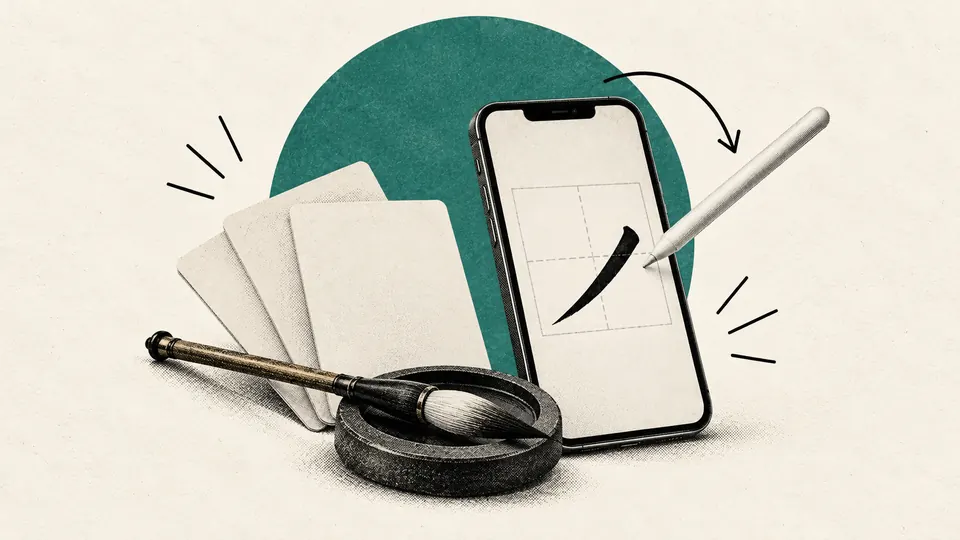
This review is for you if you're deciding whether to pay for Skritter. We read its help pages and store listings, went through its free web demo, and re-checked its HSK decks, store ratings and rival prices in late November.
Key takeaways
- Writing from memory works. In studies of adult learners, handwriting helped people remember what characters look like and mean.
- Every word becomes up to four cards. Writing, tone, pinyin and meaning are scheduled separately, so your daily reviews multiply.
- Pick the 2025 HSK decks, not the older ones. Skritter launched decks for the new HSK syllabus in November alongside its earlier lists.
- The yearly plan is the one to buy. It costs less than seven months of the monthly plan.
- If you only want to read, start with Anki or Pleco. Both charge once, and neither makes you write.
- Skritter focuses on characters. There's no grammar course, and nothing in it hears you speak.
You learn each character by writing it
Skritter's method fits on one screen, as we saw in its demo. The word's pinyin and meaning sit at the top, and below them is a square where you write with your finger or a stylus.
We went through Skritter's free web demo, which needs no account, on 11 October. It teaches you the word for Chinese, 中文, in eight short steps:
- Trace. You write each stroke over a faint outline, and a dot shows where the next one starts.
- Write from memory. The outline goes. A reveal button flashes the character's outline, and a teaching button replays the stroke order.
- Get graded. A finished character turns green when it's right and red when it isn't. You swipe up to erase and try again.
- Answer the other cards. A meaning card, a tone card and a pinyin card follow. You grade yourself on the meaning; the app checks the tone and the pinyin.
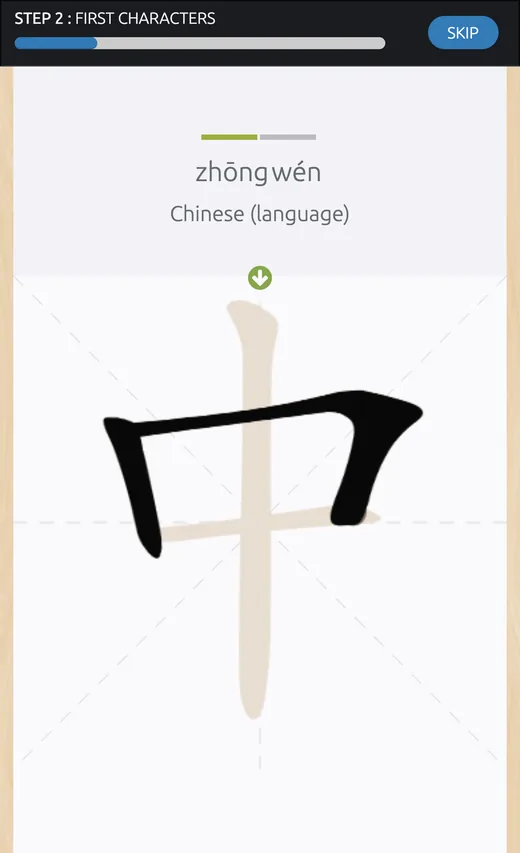
The canvas is strict about order. When we wrote the last stroke of middle, 中, first, Skritter didn't accept it. Each correct stroke snapped into a clean, brush-like line.
If the snapping feels too kind, two settings make it harder. Raw squigs shows your strokes exactly as you drew them, and rawest squigs turns off grading so you mark yourself, as you would on paper.
Here's the rest of what we found on Skritter's own pages:
| Skritter | |
|---|---|
| Card types | Writing, tone, pinyin and meaning |
| Decks | 700+ official decks, plus your own |
| HSK decks | Old HSK 1–6; 2021 lists; 2025 HSK 3.0 word and handwriting decks |
| Works on | iPhone, iPad, Android and the web |
| Free | A few decks; reviews need Premium |
| Price | $14.99 a month or $99.99 a year |
| Ratings | 4.7 on the App Store, 4.5 on Google Play |
Source: Skritter's website, help pages, forum and US store listings, first checked 11 October 2026 and re-checked 25 November 2026.
To us, it's a specialist tool. Everything in it serves one goal: getting characters into your hand and your memory.
Writing by hand helps you remember
Skritter began in 2008 as a website for learning to write characters. The research backs its core idea, with one catch.
In experiments with adult learners, writing characters by hand helped people recognise them and link them to meanings, more than reading alone did. Typing pinyin helped only with the sounds.
A review of the research from 2021 found the same split. Handwriting builds memory for a character's shape and meaning; typing builds memory for its sound.
Here's the catch: writing is slow, and it isn't the fastest road to reading. In one study, reading practice beat writing for remembering meanings and sounds. In a 2026 experiment, beginners who typed recognised more characters, while those who wrote by hand remembered meanings better.
Our take: write by hand if you want to write, or if similar characters keep blurring together. If you only need to read and type, we think you can learn faster without it.
Every word becomes four cards
Skritter splits each word into separate cards: one to write it, one for its tone, one for its pinyin and one for its meaning. Each card has its own schedule, so you can know a word's meaning cold and still miss its tone.
We like how thorough that is. It also multiplies your work: ten new words a day are forty new cards.
Skritter publishes how far apart it spaces a card you keep getting right:
Source: Skritter's guide to its spaced repetition, its interval table for new items.
Miss a card and it starts over. Skritter's grading guide says Forgot resets a card "as if it was brand new".
The help page still says no gap grows past a year. In August, staff wrote on Skritter's forum that the cap went up to ten years in 2025.
Skritter also sets a high bar: its help pages call 95% recall "a good target". The app has no setting to lower it; only the website does.
That costs reviews. In our flashcard model, a 95% goal meant about 60% more of them than Anki's default goal.
Set your own pace to see what that means for your day:
How many Skritter cards a day?
Pick your pace and the cards you'd study: you get the reviews Skritter would bring back each day, and the time they take, from the spacing Skritter publishes.
New words a day
Card types
Characters
Your recall
Seconds a card
20 new cards a day. After three months, about 100 reviews a day: 30 min.
| When | Reviews a day | Time a day |
|---|---|---|
| After a month | 70 | 23 min |
| After three months | 100 | 30 min |
| After a year | 135 | 39 min |
Writing cards only: about 25 reviews and 7 min a day after three months.
Skritter's published spacing, if you remember 95% of cards when they're due, at 15 seconds a card. A missed card starts again, and learning a new character takes longer than a review.
Sources: Skritter's help pages (its interval table, card types and 95% recall target) and its forum; answer times from the FSRS project's Anki data and one Skritter learner's report. A model, not a forecast: real queues also hold cards you added in a burst or skipped.
At five new words a day with all four card types, that's about 100 reviews a day after three months, at Skritter's 95% target.
At 15 seconds a card, that's half an hour, every day.
Learners who use it daily report the same. One Reddit learner near HSK 5 says the daily cards take "probably 1.5 hours a day".
Our advice: add fewer words than you think you can manage, and switch off the card types you don't need. Skritter lets you study writing alone, or skip tones.
Tone cards make you commit
After the writing, we think tone cards are Skritter's best idea. You draw each syllable's tone: a flat line for the first tone, a rise for the second, a dip for the third and a fall for the fourth. You tap a dot for the neutral tone.
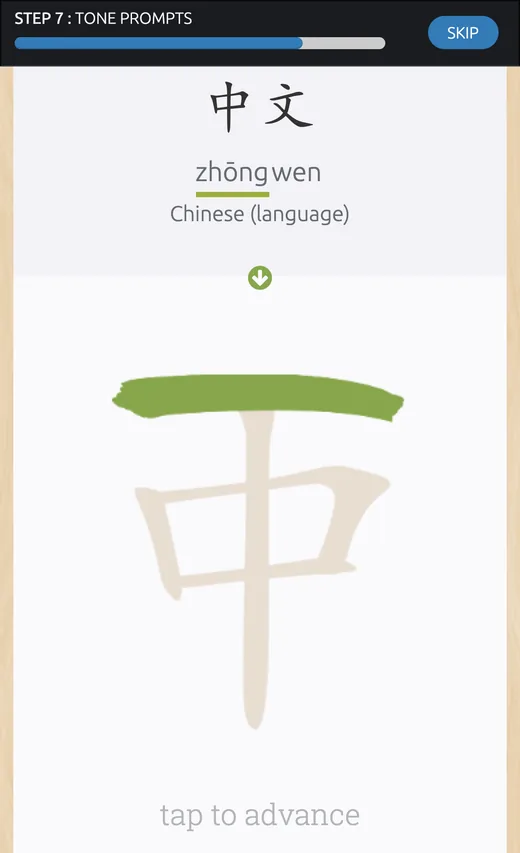
Since version 4.0 in September, you can also tap tone buttons under the canvas instead of drawing. Either way, you have to produce the tone rather than pick it from a list, and recalling an answer teaches more than recognising one.
Tone cards are also where reviews pile up. A learner with about 1,040 words wrote on Reddit that most of their 100-plus daily cards were tone cards.
One thing they can't do is hear you. A tone card checks that you remember a tone, not that you can say it. For spoken feedback, our free Tone Checker compares your pitch with 984 reference recordings, and SayMei Tones drills hearing and saying all four tones.
Pick the 2025 HSK decks, not the 2021 ones
Skritter now carries three sets of HSK word-list decks: the old exam's lists, its earlier HSK 3.0 set, and new syllabus decks launched on 24 November 2026.
That new release adds full word lists for HSK 1 to 7–9 and six handwriting decks built for the exam starting on 13 December 2026.
Check the deck's year before you start, because Skritter's older set follows the 2021 standard rather than the November 2025 syllabus. We compared the two lists word by word to see what happens if you pick the older decks by mistake:
Source: our comparison of CLEC's 2025 syllabus with the 2021 standard's lists from Chinese Testing International. Covered is the share of the new list's words found in the 2021 decks up to the same level.
We found most of the new exam's words there, about seven in eight by HSK 4. But the 2021 decks would also make you study about 1,500 words the new HSK 1–4 doesn't list.
The older handwriting decks match even less. The new syllabus names its characters to write by hand, 书写字, and so did the 2021 standard. Both lists have 1,200 characters, and they share only about half of them.
Here's where the new exam's handwriting characters sit in Skritter's 2021 decks:
Source: our comparison of the 2025 syllabus's handwriting list with the 2021 standard's, which Skritter's older handwriting decks follow. The other 30 HSK 4 characters are in the 2021 HSK 7–9 deck.
We checked the other way too. Of the 300 characters in the 2021 HSK 1–3 handwriting deck, 171 aren't on the new exam's handwriting list at any level, including eat, 吃, and water, 水.
We don't think the older decks are useless: their words are common, and you'll still want to write 吃. For the exam, though, look for the 2025 label on Skritter's word and handwriting decks, or check every level from HSK 1 to 9 on our free HSK word lists, with CSV, PDF and Anki TSV downloads.
You can study almost any textbook
In our view, Skritter's real strength is its library. Its App Store page promises more than 700 official decks, and its website counts over 12,500 lists, including ones learners made.
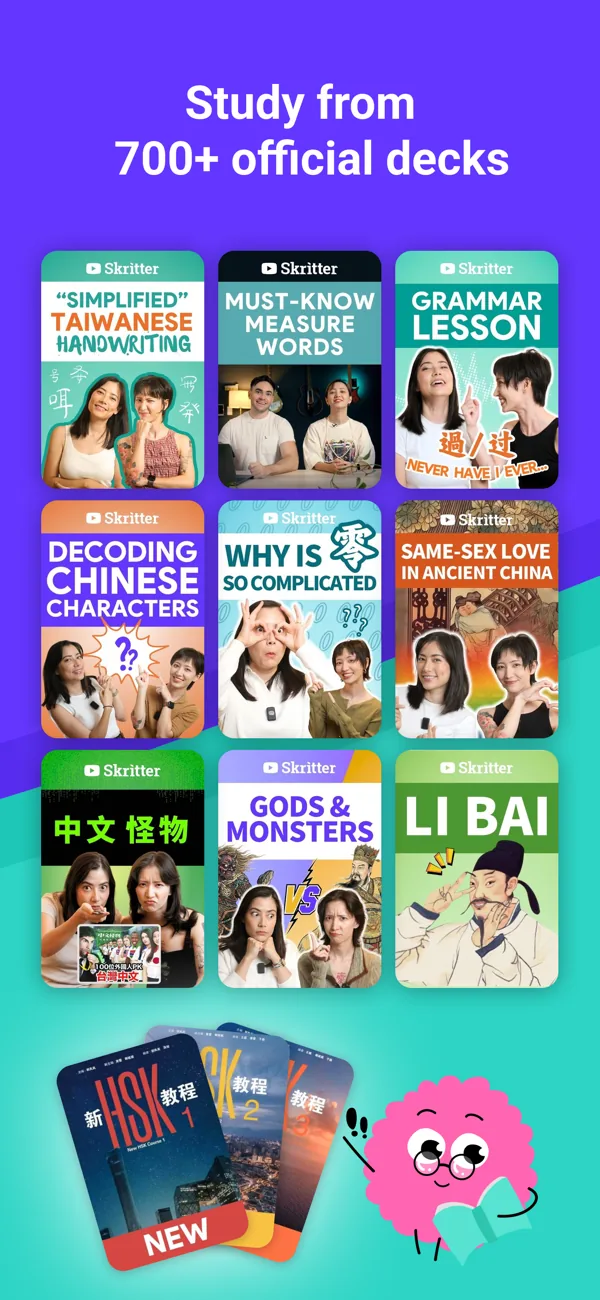
If your class uses a textbook, there's probably a deck that follows it chapter by chapter. Decks for the new official HSK course books, levels 1 to 3 plus 4A and 4B, are all in the app.
You can build your own decks too, or let words flow in from reading apps. Du Chinese, Maayot and The Chairman's Bao send words from their stories into Skritter decks, and LingQ joined in July. Pleco has no direct link: you export your bookmarks and paste them in.
If you're in a class, we think this is the best reason to pay. Your homework list is probably already there.
The yearly plan is the one to buy
Skritter Premium is a subscription, and the longer you commit, the less each month costs:
| Plan | Price | Per month |
|---|---|---|
| Monthly | $14.99 | $14.99 |
| 6 months | $59.99 | $10.00 |
| Yearly | $99.99 | $8.33 |
Source: skritter.com, checked 11 October 2026. Each plan starts with a 7-day free trial.
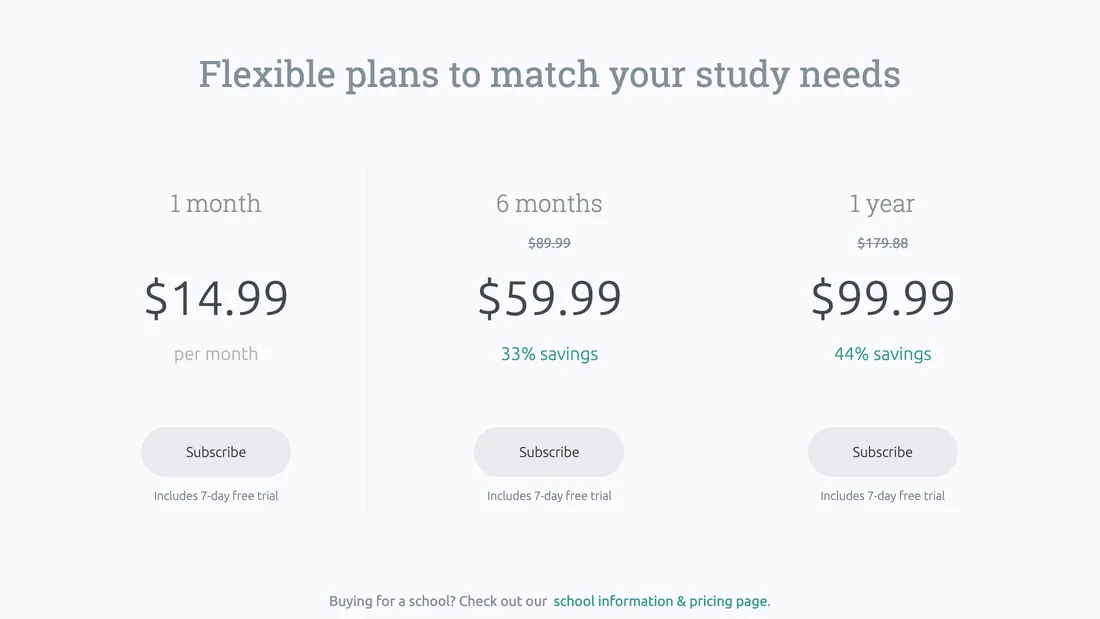
The yearly plan costs less than seven months of the monthly one. If you'll use Skritter for more than half a year, it's the plan we'd buy.
Over time, the gap with apps you buy once keeps growing:
Sources: skritter.com, Pleco's web store and the App Store, re-checked 25 November 2026. Pleco's Flashcard System add-on costs $9.99 once on its own, or comes in the Basic Bundle for $24.99 on Pleco's web store and $29.99 in the app. Anki is also free on computers. Neither Pleco nor Anki checks your strokes, so this isn't like for like.
Before you pay, we'd check what's free. Guest accounts can study a few decks for as long as they like, but spaced-repetition reviews need Premium. If a subscription lapses, you can still test yourself on words you've learned, but you can't add or review new cards.
Two more things. In the apps, Apple and Google also list other Premium prices, from $9.99 to $119.99, so check the price before you subscribe. And there's no lifetime plan: learners asked for one on Skritter's forum in June, with no reply.
Teachers can buy a class licence instead. Skritter's schools page prices one at $450 a year for up to 30 students.
When Anki or Pleco is the better buy
Anki and Pleco also review Chinese words on a schedule, and both charge once. Neither checks your strokes the way Skritter does.
Here's how the three compare for characters:
Price
- Skritter
- $99.99 a year
- Anki
- Free; $24.99 on iPhone
- Pleco
- Free; flashcards $9.99
Handwriting
- Skritter
- Checks every stroke
- Anki
- You mark yourself
- Pleco
- Checks the whole character
Tones
- Skritter
- Draw or tap each tone
- Anki
- Tone colours with an add-on
- Pleco
- A tone quiz
HSK lists
- Skritter
- 2025 HSK 3.0 word and handwriting decks
- Anki
- Free decks, including the 2025 lists
- Pleco
- The 2026 HSK 3.0 lists
Setup
- Skritter
- None
- Anki
- An evening
- Pleco
- A little
Sources: each app's website, manual or store listing, re-checked 25 November 2026, and our comparison of Chinese flashcard apps.
Here's how we'd choose, depending on what you want checked:
- Pick Anki if you want free, flexible reviews and don't need your strokes checked. The free xiě hànzì deck covers the 2025 HSK lists, with a stroke-practice grid on each card.
- Pick Pleco if it's already your dictionary. Its flashcards can ask you to write a word into its handwriting recognizer, which checks the character but not each stroke. Our Pleco review covers the rest.
- Pick Skritter if you want every stroke checked and the scheduling done for you.
Who Skritter suits, and who should skip it
We'd pick Skritter if:
- You want to write by hand. For a class, an exam with handwriting, or the pleasure of it.
- You study from a textbook. Your chapter lists are probably ready-made.
- Similar characters keep blurring together. Writing makes you notice every part. Our guide to Chinese radicals shows which parts matter most.
- You'll study most days. The schedule only works if you keep up.
We'd skip it, or pair it with something else, if:
- You mainly want to speak. Skritter never hears you.
- You only need to read and type. Anki or Pleco reviews words without the writing, and charges once.
- You want a free or one-off option. Two years of Skritter cost $199.98, whereas SayMei Characters is free with an account and Pleco's flashcards cost $9.99 once.
- You want one app for everything. There's no grammar course and no conversation.
One learner who memorised about 1,200 characters with it put the gap plainly: it "makes me memorize the characters but not the pronunciation".
Where SayMei fits, and where it doesn't
We teach Chinese mainly through spoken lessons with Mei Lin. But SayMei Characters, our handwriting trainer, overlaps with Skritter:
- Writing with stroke checks. You watch each stroke, trace the character, then write it from memory, and the pad checks every stroke. Meaning, reading and tone practice come with it, each on its own review schedule.
- The new exam's lists. It covers all 1,200 handwriting characters and 1,940 HSK 1–6 reading characters on the new syllabus, plus custom lists, in Simplified or Traditional.
- Free on web and phone. Every list, practice and review is free with a SayMei account, with no daily limit. It runs in any browser and in SayMei's iPhone and Android apps, where due flashcards also review offline.
The iPhone app isn't yet on the App Store in the EU, mainland China, Morocco or Afghanistan, where learners use the browser instead. Without an account, our worksheet generator has a Practice tab that checks your strokes, and our HSK handwriting page prints all 1,200 characters as worksheets.
To round out character study, SayMei Radicals breaks characters into their parts, and SayMei Stories and SayMei TV let you meet those words in context.
Where we lose to Skritter:
- No textbook decks. You type or paste a textbook's characters yourself.
- It's new. SayMei Characters launched in October 2026; Skritter has had years to refine its decks and scheduling.
Where we're strongest is speaking, the one skill Skritter never trains. Live lessons with Mei Lin need an internet connection, and SayMei Premium is $5.99 a month for 200 live minutes.
What to do next
- Try Skritter's demo first. It takes about five minutes and needs no account.
- Choose your card types. Switch off tones or pinyin if they aren't your goal.
- Start with a few words a day. Watch your reviews for a month before adding more.
- Pick the 2025 HSK decks. Look for the new syllabus label on Skritter's word and handwriting decks so they match the upcoming exam.
- Read and speak the words too. Writing holds characters in memory; using them makes them yours.
For the rest of your toolkit, see the best apps to learn Chinese.
FAQ
Is Skritter worth it?
It is if you want to write Chinese characters by hand and will study most days. Skritter checks every stroke you write and schedules each word's writing, tone, pinyin and meaning cards for you. It's less worth it if you only want to read or speak: Anki and Pleco review words for a one-off price, and Skritter never hears you speak. Premium costs $99.99 a year.
Is Skritter free?
Partly. Guest accounts can study a few free decks for as long as they like, but spaced-repetition reviews need Premium. Each paid plan starts with a 7-day free trial. After that, Premium costs $14.99 a month, $59.99 for six months or $99.99 a year on Skritter's website. Its free web demo needs no account at all.
Is there a cheaper alternative to Skritter?
Yes. SayMei Characters checks every stroke you write from memory, schedules reviews and covers the new HSK handwriting and reading lists, plus meaning, reading and tone practice, free with a SayMei account. Without stroke checks, Anki is free on computers and Android, and the free xiě hànzì deck covers the 2025 HSK lists with a stroke-practice grid. Pleco's Flashcard System costs $9.99 once and checks whole characters you write.
Is Skritter better than Anki for Chinese characters?
For handwriting, yes. Skritter checks each stroke, teaches stroke order and drills tones with no setup. Anki doesn't check handwriting at all, but it's free on computers and Android, $24.99 once on iPhone, and far more flexible. If you just want to recognise characters, Anki does the job for much less. Some learners use both: Anki for words, Skritter for writing.
Does Skritter have the new HSK 3.0 lists?
Yes. On 24 November 2026, Skritter launched official word decks for HSK 1 to 7–9 and six handwriting decks built on the new syllabus, plus decks for the New HSK course books through level 4. Its older decks are still around too, so check the year label if you're sitting the December exam.
How many Skritter reviews a day is normal?
It depends on how many new words you add. Each word can become four cards, and even a card you never miss comes back four times in its first three months. At five new words a day with all four card types, expect about 100 reviews a day after three months. One learner near HSK 5 reports 200 to 350 cards a day.
Do I need to learn to write Chinese characters by hand?
Not to read or type, but it helps you remember characters, and some exams ask for it. In studies of adult learners, handwriting strengthened memory for a character's shape and meaning. The new HSK lists 1,200 characters to write by hand, starting at HSK 2, where you write characters from their pinyin. If you only need to read, reading and typing practice is faster.
Does Skritter work for traditional characters?
Yes. You can study simplified, traditional or both, though both roughly doubles your reviews. Zhuyin can replace pinyin, and there's a Taiwan Ministry of Education font. One catch: automatic grading is based on a simplified-style font, so writing in the Taiwan style means grading yourself. Skritter also uses mainland pronunciations throughout.
Sources
First checked 11 October 2026; Skritter's forum, docs and store listings, plus Anki and Pleco prices, re-checked 25 November 2026.
Skritter
- Skritter home page and plans, features, about and schools
- Free web demo, which needs no account
- Help pages: spaced repetition, grading buttons, vocabulary FAQ, mobile settings, writing modes, mobile billing, simplified and traditional characters, standard references, partner integrations, importing from Pleco and what's new
- Forum: HSK 3.0 (2021) decks (29 June 2021), new HSK lists (to 24 November 2026), interval cap, active development and long-term discounts
- Skritter on the App Store (version 2026.10.2, 3 November 2026) and Google Play
- Skritter blog: native-speaker audio for HSK 1–4 (2020) and LingQ integration (July 2026)
HSK lists
- CLEC, HSK exam syllabus (November 2025): words and handwriting characters by level
- The 2021 standard, GF 0025-2021: words from Chinese Testing International's Standard Query database; handwriting characters from the Ministry of Education's PDF, as transcribed by elkmovie/hsk30 and krmanik/HSK-3.0
- Exam dates and formats: our HSK 3.0 guide
Other apps
- Pleco's web store, Pleco bundles, Pleco flashcards manual and Pleco on the App Store (version 3.2.88, 19 November 2026; 2026 HSK 3.0 lists added in 3.2.83)
- AnkiMobile on the App Store and Anki
- Anki xiě hànzì decks
- Our comparison of Chinese flashcard apps
Research
- Guan, C. Q., et al. (2011). Writing strengthens orthography and alphabetic-coding strengthens phonology in learning to read Chinese. Journal of Educational Psychology 103(3). https://doi.org/10.1037/a0023730
- Lyu, B., Lai, C., Lin, C.-H., & Gong, Y. (2021). Comparison studies of typing and handwriting in Chinese language learning: A synthetic review. International Journal of Educational Research 106. https://doi.org/10.1016/j.ijer.2021.101740
- Xu, Y., Chang, L., Zhang, J., & Perfetti, C. A. (2013). Reading, writing, and animation in character learning in Chinese as a foreign language. Foreign Language Annals 46(3). https://doi.org/10.1111/flan.12040
- Shi, Q., Hu, B., & Zhu, Z. (2026). Orthography-sound vs. orthography-meaning mapping in Chinese character learning: Evidence on typing and handwriting. Foreign Language Annals 59(2). https://doi.org/10.1111/flan.70053
- Rowland, C. A. (2014). The effect of testing versus restudy on retention. Psychological Bulletin 140(6). https://doi.org/10.1037/a0037559
Learners
- Reddit, r/ChineseLanguage: Skritter reviews are so huge; resources for learning to write; is Skritter Premium worth it?; writing apps other than Skritter
SayMei
- SayMei Characters, SayMei Radicals, SayMei Tones, Tone Checker, worksheet generator, HSK handwriting characters, iPhone, Android and pricing
Methods
Everything here comes from public pages first read on 11 October 2026 and re-checked on 25 November 2026: Skritter's website, help center, blog and forum; its US App Store and Google Play listings; its free web demo; Anki's and Pleco's store pages and manuals; published research; and Reddit threads. We didn't subscribe or create an account, so what Skritter says Premium does and what sits inside its 2025 decks are reported as its claims.
The demo. We went through Skritter's demo in a browser with no account, at desktop and phone widths, writing the strokes from open stroke data. We stopped at the sign-up form. The two demo pictures are our captures; the deck picture is Skritter's own, from its App Store listing.
HSK decks. We couldn't open Skritter's decks without an account, so our overlap counts compare the 2021 standard against the November 2025 syllabus. The 2021 standard's 11,092 words come from Chinese Testing International's database, and the 2025 words from CLEC's syllabus, as in our HSK 3.0 guide. We matched written forms, split the 2021 list's variant entries and matched erhua forms, such as play, 玩儿 and 玩. Shares use distinct written words. The 2021 handwriting list comes from two transcriptions of the Ministry of Education's PDF, which differ by one character.
The workload tool. A card follows Skritter's published spacing while you keep getting it right. A missed card is retried in the same session, then follows the table's after-a-miss row, which we extend at its own ratio of about 2.25. Every review is remembered with the same chance, and every day adds the same number of new cards. It's a model: it leaves out Skritter's small random spread, its timing adjustments and days you skip.
If you spot a mistake, tell us: we fix errors.